
QianWen CLI

模型、额度、价格和账单,打开终端就能查。QianWen CLI 是千问 AI 平台官方命令行工具,帮你少写 curl、少切控制台,日常查询和排障都更省事。
对 AI Agent 也很友好:输出结构清晰、便于解析,命令成功还是失败都有明确反馈。
查看 CLI 完整文档,了解全部命令、参数和进阶用法。



亮点
-
选模型:直接比较模态、上下文窗口、免费额度和 CNY 单价,不用自己调用接口再整理结果。
-
看用量和账单:集中查看 Token Plan、按量付费用量、账单和余额,少在多个页面间切换。
-
快速排障:一条命令检查版本、认证、Token、网络、配置和 Shell 补全,并给出下一步处理建议。
安装
需要 Node.js 18 或更高版本。推荐通过 npm 全局安装:
npm install -g @qianwenai/qianwen-cli
qianwen version
看到 1.3.0 即表示安装成功。
找不到命令时
如果终端提示 command not found: qianwen,通常是 npm 的全局可执行目录尚未加入 PATH。按当前 Shell 执行一次:
| Shell | 命令 |
|---|---|
| bash | echo 'export PATH="$(npm config get prefix)/bin:$PATH"' >> ~/.bashrc && source ~/.bashrc |
| zsh | echo 'export PATH="$(npm config get prefix)/bin:$PATH"' >> ~/.zshrc && source ~/.zshrc |
从源码构建
需要参与开发或验证未发布改动时,可以从公开仓库构建:
git clone https://github.com/QianWen-AI/qianwen-cli.git
cd qianwen-cli
pnpm install
pnpm run build
pnpm link --global .
qianwen version
快速开始
安装后只需登录一次,就能开始查询:
# 1. 登录
qianwen auth login
# 2. 查看可用模型
qianwen models list
# 3. 查看一个真实模型的详情
qianwen models info qwen3.7-flash
交互式终端登录使用 PKCE,非交互环境使用 Device Flow。登录成功后,凭证优先保存在操作系统钥匙串中;钥匙串不可用时回退到加密文件。
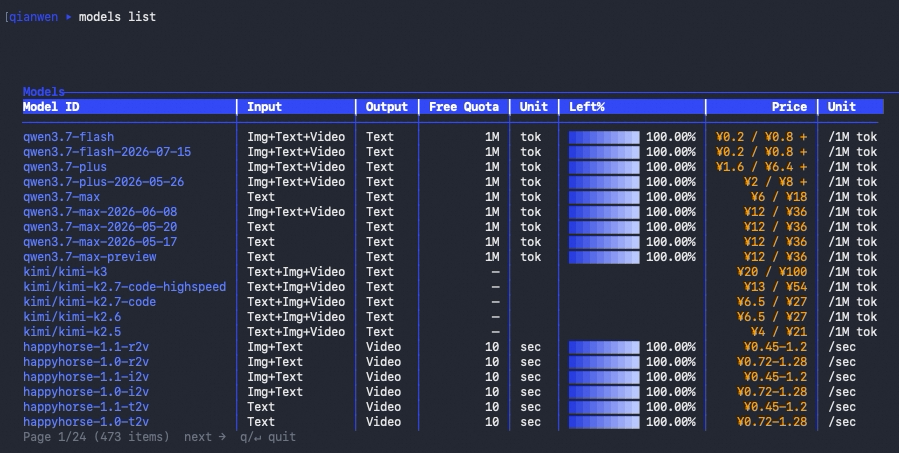
第一条查询就能看到模型目录。下面的 1.3.0 实际输出一次查到 473 个模型,并在同一张表中给出模态、额度和价格。
能做什么
CLI 顶层命令分为 5 个能力域。每个域对应一类日常工作,不需要先理解后端接口或服务拆分。
| 能力域 | 能帮你省什么事 | 包含命令 |
|---|---|---|
| Core(核心) | 找模型、比价格、查接入文档,不用在模型广场和文档站之间来回找 | models、docs |
| Account & access(账号与访问) | 登录一次并确认当前凭证、可访问 Workspace 和数量上限 | auth、workspace |
| Usage & billing(用量与账单) | 在一个入口查看免费额度、Token Plan、PAYG、账单、余额和充值 | usage、billing、subscription |
| Operations(运维) | 诊断本地环境、管理配置与补全,并检查当前版本 | doctor、config、completion、version |
| Support(支持) | 提交和跟进支持工单,同时确认 CLI 是否有新版本 | support、update |
国内站支持 billing balance summary 查看账户余额,并通过 billing balance recharge 打开充值页。qianwen update 只检查新版本并给出升级提示,不会直接安装软件。
从常见任务开始
| 想做什么 | 先运行 |
|---|---|
| 查看模型上下文、价格和限流 | qianwen models info qwen3.7-flash |
| 搜索官方接入文档 | qianwen docs search "chat completions" |
| 汇总本月额度和费用 | qianwen usage summary --period month |
| 按模型拆分账单 | qianwen billing breakdown --group-by model |
| 检查本地环境 | qianwen doctor |
全部 39 个命令及参数见 完整命令参考。
实际效果
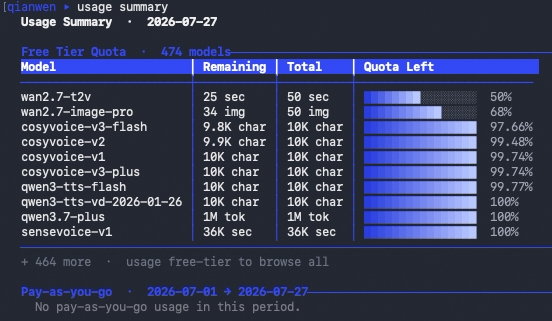
usage summary 把当前免费额度、Token Plan 和指定周期的按量付费用量汇总到同一条命令中;没有订阅或消费时,只展示账号实际拥有的数据。
使用方式
交互与一次性命令
不带参数运行 qianwen 进入交互模式,适合边看提示边探索;带命令运行时执行一次后退出,适合日常查询和脚本。
qianwen                                      # 进入交互模式
qianwen models list                          # 执行一次后退出
qianwen usage breakdown --help               # 就地查看精确语法
qianwen completion install --shell zsh       # 安装 zsh 补全
每层命令都支持 --help;Shell 补全还支持 bash 和 fish。
开启 Tab 补全
安装一次并重启终端,之后按 Tab 即可补全命令、子命令和常用 Flag,少敲少记。 运行 qianwen completion install;支持 bash、zsh、fish,无法自动识别时加 --shell <bash|zsh|fish>。
认证与凭证
在普通终端运行 qianwen auth login 时,CLI 通过 PKCE 打开浏览器完成登录。无交互终端采用 Device Flow,并自动返回授权信息,避免等待输入。
需要检查或清除当前凭证时:
qianwen auth status --format json
qianwen auth logout
非交互环境、CI 等场景的两阶段登录方法见 CLI 完整文档。
凭证优先存入操作系统钥匙串;系统钥匙串不可用时,CLI 自动使用加密文件回退,无需手动选择存储方式。
输出、配置与自动化
选择输出格式
交互终端默认显示表格;管道或重定向默认输出 JSON。脚本中建议显式指定 --format json,避免输出形式随环境变化:
qianwen models list --all --format json
下面是 qianwen models info qwen3.7-flash --format json 实际输出中的常用字段节选:
{
  "id": "qwen3.7-flash",
  "modality": { "input": ["image", "text", "video"], "output": ["text"] },
  "features": [
    "batch",
    "cache",
    "function-calling",
    "model-experience",
    "prefix-completion",
    "structured-outputs",
    "web-search"
  ],
  "pricing": { "summary": { "cheapest_input": 0.2, "cheapest_output": 0.8, "unit": "CNY/1M tokens" } },
  "context": { "context_window": 1000000, "max_input": 991808, "max_output": 65536 }
}
参数或配置不合法时,JSON 模式会给出可判断的错误代码、消息和退出码。例如运行 qianwen config set output.format invalid --format json 会返回:
{
  "error": {
    "code": "CONFIG_ERROR",
    "message": "Invalid value for output.format. Allowed: auto, table, json, text",
    "exit_code": 4
  }
}
固定默认输出
全局配置文件位于 ~/.qianwen/config.json。1.3.0 唯一公开配置项是 output.format,可选 auto、table、json、text,默认值为 auto。
qianwen config list --format json
qianwen config get output.format
qianwen config set output.format json
qianwen config unset output.format
命令行显式传入的 --format 优先于配置值;unset 会恢复自动选择输出格式。
退出码
| 代码 | 含义 |
|---|---|
0 | 成功 |
1 | 通用错误 |
2 | 认证失败 |
3 | 网络错误 |
4 | 参数或配置错误 |
5 | 触发限流 |
6 | 服务端错误 |
7 | 资源不存在 |
8 | 任务未完成 |
130 | 用户中断 |
完整输出和错误约定见 CLI 文档。
排查问题
先运行一站式自检,它会检查版本、认证、Token、网络、Shell 补全和全局配置:
qianwen doctor --format json
根据结果修复后再次运行,直到失败项消失。还可以用 qianwen version --check 或 qianwen update 检查是否有新版本;二者都不会直接安装更新。
文档与支持
CLI 完整文档 是深入用法的权威入口,涵盖全部命令、参数以及非交互、CI、Agent 集成等进阶场景,并提供可复制的 Markdown 文档。
自检后仍无法解决,可以前往 GitHub Issues 反馈,或通过 qianwen support create 提交支持工单。
开发与贡献
欢迎提交修复、文档改进和聚焦的功能提议。贡献前请先确认相关 Issue,避免重复工作。
-
Fork 仓库,并从最新的
main分支开始。 -
创建聚焦的分支,例如
fix/auth-token-expiry或docs/install-options。 -
运行
pnpm install安装依赖。 -
完成修改;行为发生变化时同步添加或更新测试。
-
提交前运行质量检查:
pnpm run lint pnpm run format:check pnpm test pnpm run build -
建议使用 Conventional Commits,例如
feat:、fix:、docs:、refactor:或chore:。 -
推送分支,并向
main发起 Pull Request。 -
在 PR 中关联 Issue,说明用户可见变化;终端体验变化请附截图或输出。
License
本项目基于 Apache-2.0 许可证 授权。