
本文介绍通过 WebSocket 连接访问 Qwen3-TTS-Realtime 实时语音合成服务的接口地址、请求头和交互流程。
用户指南:关于模型介绍和选型建议请参见实时语音合成
Qwen3-TTS Realtime API 基于 WebSocket 协议。Java 和 Python 推荐通过 DashScope SDK 调用,可免去处理 WebSocket 细节;其他语言可使用 WebSocket 库直接连接。
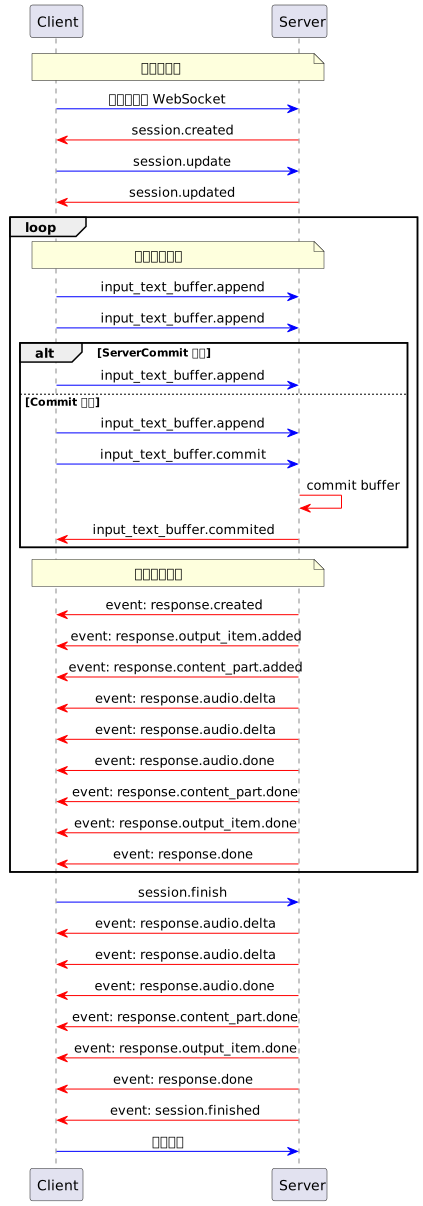 关键流程说明:
接口地址
WebSocket URL 固定如下,通过查询参数model 指定要调用的模型名称:
WebSocket URL:wss://maas.qianwenaiapi.com/api-ws/v1/realtime?model=qwen3-tts-flash-realtime
URL 必须使用
wss:// 协议。Authorization 在请求头中设置(参见请求头),模型通过 URL 查询参数 model 指定。请求头
请求头中需添加如下信息:| 参数 | 类型 | 是否必选 | 说明 |
|---|---|---|---|
| Authorization | string | 是 | 鉴权令牌,格式为 Bearer $DASHSCOPE_API_KEY,将 $DASHSCOPE_API_KEY 替换为实际的 API Key。 |
| user-agent | string | 否 | 客户端标识,便于服务端追踪来源。 |
| X-DashScope-WorkSpace | string | 否 | 千问AI平台业务空间ID。 |
Authorization 鉴权在 WebSocket 握手阶段验证。如果 API Key 无效或缺失,握手将失败并返回 HTTP 401/403 错误。
交互流程
客户端事件和服务端事件的详细说明,请参见客户端事件和服务端事件。 支持两种使用模式:- ServerCommit 模式:服务端智能判断文本分段与合成时机,开发者无需关心内部状态切分。
- Commit 模式:客户端控制每一段文本的提交时间,需显式调用
input_text_buffer.commit触发合成。
模式说明:
- ServerCommit 模式下调用
input_text_buffer.append多次,系统根据内部规则判断合成起点。 - 若在 ServerCommit 模式中主动调用
input_text_buffer.commit,表示立即合成当前缓冲内容,后续仍维持 ServerCommit 模式。 - Commit 模式下仅调用
input_text_buffer.append不会触发合成,需明确调用input_text_buffer.commit。
-
连接阶段:客户端发起 WebSocket 连接,服务端返回
session.created,表示会话已初始化。 -
配置会话:客户端发送
session.update事件设置音色、格式、模式等参数。 -
文本输入阶段:客户端通过多次发送
input_text_buffer.append添加文本到缓冲区。 -
触发合成阶段:
- ServerCommit 模式中系统自动判断合成时机,或客户端手动调用
input_text_buffer.commit强制触发。 - Commit 模式中仅
input_text_buffer.commit操作才会真正触发语音合成流程。
- ServerCommit 模式中系统自动判断合成时机,或客户端手动调用
-
音频生成阶段:服务端发出
response.created表示任务已启动,随后分片返回音频response.audio.delta(base64 编码),直到response.audio.done。 -
会话结束阶段:客户端显式调用
session.finish通知服务端清理状态,服务端返回session.finished后关闭连接。
session.created 事件:
复制
{
    "event_id": "event_xxx",
    "type": "session.created",
    "session": {
        "object": "realtime.session",
        "mode": "server_commit",
        "model": "qwen3-tts-flash-realtime",
        "voice": "Cherry",
        "response_format": "pcm",
        "sample_rate": 24000,
        "id": "sess_xxx"
    }
}
示例代码
以下示例提供 Python、Java 客户端以及两种提交模式。先配置DASHSCOPE_API_KEY。Python 需要 websockets、pyaudio;Java 需要 Java-WebSocket、Gson,并使用 Java Sound 播放音频。每个客户端事件使用独立 UUID。
Java
复制
<dependencies>
    <dependency>
        <groupId>org.java-websocket</groupId>
        <artifactId>Java-WebSocket</artifactId>
        <version>1.5.3</version>
    </dependency>
    <dependency>
        <groupId>com.google.code.gson</groupId>
        <artifactId>gson</artifactId>
        <version>2.10.1</version>
    </dependency>
</dependencies>
- 创建客户端
- Java
- Python
在本地新建 Java 文件,命名为
TTSRealtimeClient.java并复制以下代码到文件中:复制
import com.google.gson.Gson;
import com.google.gson.JsonObject;
import org.java_websocket.client.WebSocketClient;
import org.java_websocket.handshake.ServerHandshake;

import java.net.URI;
import java.util.Base64;
import java.util.HashMap;
import java.util.Map;
import java.util.concurrent.CountDownLatch;
import java.util.function.Consumer;

/**
 * 与 TTS Realtime API 交互的客户端。
 *
 * 该类提供了连接 TTS Realtime API、发送文本数据、获取音频输出以及管理 WebSocket 连接的相关方法。
 */
public class TTSRealtimeClient {

    public enum SessionMode {
        SERVER_COMMIT("server_commit"),
        COMMIT("commit");
        private final String value;
        SessionMode(String value) { this.value = value; }
        public String getValue() { return value; }
    }

    /**
     * 音频回调接口
     */
    public interface AudioCallback {
        void onAudio(byte[] audioData);
    }

    private final String baseUrl;
    private final String apiKey;
    private final String voice;
    private final SessionMode mode;
    private final String languageType;
    private final AudioCallback audioCallback;
    private final Gson gson = new Gson();

    private WebSocketClient ws;
    private CountDownLatch responseDoneLatch;
    private CountDownLatch sessionFinishedLatch;

    public TTSRealtimeClient(String baseUrl, String apiKey, String voice,
                             SessionMode mode, AudioCallback audioCallback,
                             String languageType) {
        this.baseUrl = baseUrl;
        this.apiKey = apiKey;
        this.voice = voice;
        this.mode = mode;
        this.audioCallback = audioCallback;
        this.languageType = languageType;
    }

    public TTSRealtimeClient(String baseUrl, String apiKey, String voice,
                             SessionMode mode, AudioCallback audioCallback) {
        this(baseUrl, apiKey, voice, mode, audioCallback, "Auto");
    }

    /**
     * 与 TTS Realtime API 建立 WebSocket 连接。
     */
    public void connect() throws Exception {
        Map<String, String> headers = new HashMap<>();
        headers.put("Authorization", "Bearer " + apiKey);

        responseDoneLatch = new CountDownLatch(0);
        sessionFinishedLatch = new CountDownLatch(1);

        ws = new WebSocketClient(new URI(baseUrl), headers) {
            @Override
            public void onOpen(ServerHandshake handshake) {
                System.out.println("WebSocket 连接已建立");
                // 发送默认会话配置
                JsonObject session = new JsonObject();
                session.addProperty("mode", mode.getValue());
                session.addProperty("voice", TTSRealtimeClient.this.voice);
                session.addProperty("language_type", languageType);
                session.addProperty("response_format", "pcm");
                session.addProperty("sample_rate", 24000);
                updateSession(session);
            }

            @Override
            public void onMessage(String message) {
                JsonObject event = gson.fromJson(message, JsonObject.class);
                String eventType = event.has("type") ? event.get("type").getAsString() : "";

                if (!"response.audio.delta".equals(eventType)) {
                    System.out.println("收到事件: " + eventType);
                }

                switch (eventType) {
                    case "error":
                        System.err.println("错误: " + event.get("error"));
                        break;
                    case "session.created":
                        System.out.println("会话创建,ID: " +
                            event.getAsJsonObject("session").get("id").getAsString());
                        break;
                    case "session.updated":
                        System.out.println("会话更新,ID: " +
                            event.getAsJsonObject("session").get("id").getAsString());
                        break;
                    case "input_text_buffer.committed":
                        System.out.println("文本缓冲区已提交,项目ID: " + event.get("item_id"));
                        break;
                    case "input_text_buffer.cleared":
                        System.out.println("文本缓冲区已清除");
                        break;
                    case "response.created":
                        System.out.println("响应已创建,ID: " +
                            event.getAsJsonObject("response").get("id").getAsString());
                        responseDoneLatch = new CountDownLatch(1);
                        break;
                    case "response.output_item.added":
                        System.out.println("输出项已添加,ID: " +
                            event.getAsJsonObject("item").get("id").getAsString());
                        break;
                    case "response.audio.delta":
                        if (audioCallback != null) {
                            byte[] audioBytes = Base64.getDecoder().decode(
                                event.get("delta").getAsString());
                            audioCallback.onAudio(audioBytes);
                        }
                        break;
                    case "response.audio.done":
                        System.out.println("音频生成完成");
                        break;
                    case "response.done":
                        System.out.println("响应完成");
                        responseDoneLatch.countDown();
                        break;
                    case "session.finished":
                        System.out.println("会话已结束");
                        sessionFinishedLatch.countDown();
                        break;
                }
            }

            @Override
            public void onClose(int code, String reason, boolean remote) {
                System.out.println("连接已关闭: " + reason);
            }

            @Override
            public void onError(Exception ex) {
                System.err.println("WebSocket 错误: " + ex.getMessage());
            }
        };
        ws.connectBlocking();
    }

    /**
     * 发送事件到服务器。
     */
    public void sendEvent(JsonObject event) {
        String eventId = "event_" + java.util.UUID.randomUUID().toString();
        event.addProperty("event_id", eventId);
        System.out.println("发送事件: type=" + event.get("type").getAsString()
            + ", event_id=" + eventId);
        ws.send(gson.toJson(event));
    }

    /**
     * 更新会话配置。
     */
    public void updateSession(JsonObject config) {
        JsonObject event = new JsonObject();
        event.addProperty("type", "session.update");
        event.add("session", config);
        System.out.println("更新会话配置: " + event);
        sendEvent(event);
    }

    /**
     * 向 API 发送文本数据。
     */
    public void appendText(String text) {
        JsonObject event = new JsonObject();
        event.addProperty("type", "input_text_buffer.append");
        event.addProperty("text", text);
        sendEvent(event);
    }

    /**
     * 提交文本缓冲区以触发处理。
     */
    public void commitTextBuffer() {
        JsonObject event = new JsonObject();
        event.addProperty("type", "input_text_buffer.commit");
        sendEvent(event);
    }

    /**
     * 清除文本缓冲区。
     */
    public void clearTextBuffer() {
        JsonObject event = new JsonObject();
        event.addProperty("type", "input_text_buffer.clear");
        sendEvent(event);
    }

    /**
     * 结束会话。
     */
    public void finishSession() {
        JsonObject event = new JsonObject();
        event.addProperty("type", "session.finish");
        sendEvent(event);
    }

    /**
     * 等待 response.done 事件。
     */
    public void waitForResponseDone() throws InterruptedException {
        responseDoneLatch.await();
    }

    /**
     * 等待 session.finished 事件。
     */
    public void waitForSessionFinished() throws InterruptedException {
        sessionFinishedLatch.await();
    }

    /**
     * 关闭 WebSocket 连接。
     */
    public void close() {
        if (ws != null) {
            ws.close();
        }
    }
}
在本地新建 Python 文件,命名为
tts_realtime_client.py并复制以下代码到文件中:复制
# -- coding: utf-8 --

import asyncio
import websockets
import json
import base64
import time
import uuid
from typing import Optional, Callable, Dict, Any
from enum import Enum

class SessionMode(Enum):
  SERVER_COMMIT = "server_commit"
  COMMIT = "commit"

class TTSRealtimeClient:
  """
  与 TTS Realtime API 交互的客户端。

  该类提供了连接 TTS Realtime API、发送文本数据、获取音频输出以及管理 WebSocket 连接的相关方法。

  属性说明:
    base_url (str):
      Realtime API 的基础地址。
    api_key (str):
      用于身份验证的 API Key。
    voice (str):
      服务端合成语音所使用的声音。
    mode (SessionMode):
      会话模式,可选 server_commit 或 commit。
    audio_callback (Callable[[bytes], None]):
      接收音频数据的回调函数。
    language_type(str)
      合成的语音的语种,可选值Chinese、English、German、Italian、Portuguese、Spanish、Japanese、Korean、French、Russian、Auto
  """

  def __init__(
      self,
      base_url: str,
      api_key: str,
      voice: str = "Cherry",
      mode: SessionMode = SessionMode.SERVER_COMMIT,
      audio_callback: Optional[Callable[[bytes], None]] = None,
    language_type: str = "Auto"):
    self.base_url = base_url
    self.api_key = api_key
    self.voice = voice
    self.mode = mode
    self.ws = None
    self.audio_callback = audio_callback
    self.language_type = language_type

    # 当前回复状态
    self._current_response_id = None
    self._current_item_id = None
    self._is_responding = False
    self._response_done_future = None

  async def connect(self) -> None:
    """与 TTS Realtime API 建立 WebSocket 连接。"""
    headers = {
      "Authorization": f"Bearer {self.api_key}"
    }

    self.ws = await websockets.connect(self.base_url, additional_headers=headers)

    # 设置默认会话配置
    await self.update_session({
      "mode": self.mode.value,
      "voice": self.voice,
      "language_type": self.language_type,
      "response_format": "pcm",
      "sample_rate": 24000
    })

  async def send_event(self, event) -> None:
    """发送事件到服务器。"""
    event['event_id'] = "event_" + uuid.uuid4().hex
    print(f"发送事件: type={event['type']}, event_id={event['event_id']}")
    await self.ws.send(json.dumps(event))

  async def update_session(self, config: Dict[str, Any]) -> None:
    """更新会话配置。"""
    event = {
      "type": "session.update",
      "session": config
    }
    print("更新会话配置: ", event)
    await self.send_event(event)

  async def append_text(self, text: str) -> None:
    """向 API 发送文本数据。"""
    event = {
      "type": "input_text_buffer.append",
      "text": text
    }
    await self.send_event(event)

  async def commit_text_buffer(self) -> None:
    """提交文本缓冲区以触发处理。"""
    event = {
      "type": "input_text_buffer.commit"
    }
    await self.send_event(event)

  async def clear_text_buffer(self) -> None:
    """清除文本缓冲区。"""
    event = {
      "type": "input_text_buffer.clear"
    }
    await self.send_event(event)

  async def finish_session(self) -> None:
    """结束会话。"""
    event = {
      "type": "session.finish"
    }
    await self.send_event(event)

  async def wait_for_response_done(self):
    """等待 response.done 事件"""
    if self._response_done_future:
      await self._response_done_future

  async def handle_messages(self) -> None:
    """处理来自服务器的消息。"""
    try:
      async for message in self.ws:
        event = json.loads(message)
        event_type = event.get("type")

        if event_type != "response.audio.delta":
          print(f"收到事件: {event_type}")

        if event_type == "error":
          print("错误: ", event.get('error', {}))
          continue
        elif event_type == "session.created":
          print("会话创建,ID: ", event.get('session', {}).get('id'))
        elif event_type == "session.updated":
          print("会话更新,ID: ", event.get('session', {}).get('id'))
        elif event_type == "input_text_buffer.committed":
          print("文本缓冲区已提交,项目ID: ", event.get('item_id'))
        elif event_type == "input_text_buffer.cleared":
          print("文本缓冲区已清除")
        elif event_type == "response.created":
          self._current_response_id = event.get("response", {}).get("id")
          self._is_responding = True
          # 创建新的 future 来等待 response.done
          self._response_done_future = asyncio.Future()
          print("响应已创建,ID: ", self._current_response_id)
        elif event_type == "response.output_item.added":
          self._current_item_id = event.get("item", {}).get("id")
          print("输出项已添加,ID: ", self._current_item_id)
        # 处理音频增量
        elif event_type == "response.audio.delta" and self.audio_callback:
          audio_bytes = base64.b64decode(event.get("delta", ""))
          self.audio_callback(audio_bytes)
        elif event_type == "response.audio.done":
          print("音频生成完成")
        elif event_type == "response.done":
          self._is_responding = False
          self._current_response_id = None
          self._current_item_id = None
          # 标记 future 完成
          if self._response_done_future and not self._response_done_future.done():
            self._response_done_future.set_result(True)
          print("响应完成")
        elif event_type == "session.finished":
          print("会话已结束")

    except websockets.exceptions.ConnectionClosed:
      print("连接已关闭")
    except Exception as e:
      print("消息处理出错: ", str(e))

  async def close(self) -> None:
    """关闭 WebSocket 连接。"""
    if self.ws:
      await self.ws.close()
-
选择语音合成模式
Realtime API支持以下两种模式:
- server_commit 模式:服务端智能判断文本分段与合成时机,客户端只需发送文本。适合低延迟场景(如 GPS 导航)。
- commit 模式:客户端将文本添加至缓冲区后主动触发合成。适合精细控制断句的场景(如新闻播报)。
- server_commit 模式
- commit 模式
- Java
- Python
在编译并运行
TTSRealtimeClient.java的同级目录下新建另一个 Java 文件,命名为ServerCommit.java,并将以下代码复制进文件中:复制
import javax.sound.sampled.*;
import java.io.*;
import java.util.ArrayList;
import java.util.List;
import java.util.concurrent.ConcurrentLinkedQueue;
import java.util.concurrent.atomic.AtomicBoolean;

public class ServerCommit {
        private static final String URL = "wss://maas.qianwenaiapi.com/api-ws/v1/realtime?model=qwen3-tts-flash-realtime";
    // 获取API Key:https://platform.qianwenai.com/home/api-keys
    // 若没有配置环境变量,请用千问AI平台API Key将下行替换为:private static final String API_KEY = "sk-xxx";
    private static final String API_KEY = System.getenv("DASHSCOPE_API_KEY");
    private static final int SAMPLE_RATE = 24000;

    // 音频数据缓存
    private static final List<byte[]> audioChunks = new ArrayList<>();
    // 实时播放队列
    private static final ConcurrentLinkedQueue<byte[]> playbackQueue = new ConcurrentLinkedQueue<>();
    private static final AtomicBoolean playing = new AtomicBoolean(true);

    public static void main(String[] args) throws Exception {
        if (API_KEY == null || API_KEY.isEmpty()) {
            throw new IllegalStateException("请设置 DASHSCOPE_API_KEY 环境变量");
        }

        // 初始化音频播放
        AudioFormat format = new AudioFormat(SAMPLE_RATE, 16, 1, true, false);
        DataLine.Info info = new DataLine.Info(SourceDataLine.class, format);
        SourceDataLine audioLine = (SourceDataLine) AudioSystem.getLine(info);
        audioLine.open(format);
        audioLine.start();

        // 启动播放线程
        Thread playerThread = new Thread(() -> {
            while (playing.get() || !playbackQueue.isEmpty()) {
                byte[] chunk = playbackQueue.poll();
                if (chunk != null) {
                    audioLine.write(chunk, 0, chunk.length);
                } else {
                    try { Thread.sleep(10); } catch (InterruptedException ignored) {}
                }
            }
        });
        playerThread.start();

        // 创建 TTS 客户端
        TTSRealtimeClient client = new TTSRealtimeClient(
            URL, API_KEY, "Cherry",
            TTSRealtimeClient.SessionMode.SERVER_COMMIT,
            audioData -> {
                playbackQueue.add(audioData);
                audioChunks.add(audioData);
                System.out.println("收到音频数据: " + audioData.length + " bytes");
            }
        );

        client.connect();

        // 发送文本片段
        String[] textFragments = {
            "千问AI平台是一站式的大模型开发及应用构建平台。",
            "不论是开发者还是业务人员,都能深入参与大模型应用的设计和构建。",
            "您可以通过简单的界面操作,在5分钟内开发出一款大模型应用,",
            "或在几小时内训练出一个专属模型,从而将更多精力专注于应用创新。"
        };

        System.out.println("开始发送文本...");
        for (String text : textFragments) {
            System.out.println("发送片段: " + text);
            client.appendText(text);
            Thread.sleep(100);
        }

        Thread.sleep(1000);
        client.finishSession();

        // 等待响应完成
        client.waitForResponseDone();
        client.waitForSessionFinished();
        client.close();

        // 等待播放完成
        playing.set(false);
        playerThread.join();
        audioLine.drain();
        audioLine.close();

        // 保存音频文件
        saveWav("output.wav");
        System.out.println("完成");
    }

    private static void saveWav(String filename) throws IOException {
        if (audioChunks.isEmpty()) {
            System.out.println("没有音频数据可保存");
            return;
        }
        ByteArrayOutputStream bos = new ByteArrayOutputStream();
        for (byte[] chunk : audioChunks) {
            bos.write(chunk);
        }
        byte[] allAudio = bos.toByteArray();
        AudioFormat format = new AudioFormat(SAMPLE_RATE, 16, 1, true, false);
        AudioInputStream ais = new AudioInputStream(
            new ByteArrayInputStream(allAudio), format, allAudio.length / 2);
        new File("outputs").mkdirs();
        AudioSystem.write(ais, AudioFileFormat.Type.WAVE,
            new File("outputs/" + filename));
        System.out.println("音频已保存到: outputs/" + filename);
    }
}
ServerCommit.java,即可听到 Realtime API实时生成的音频。在运行
tts_realtime_client.py的同级目录下新建另一个 Python 文件,命名为server_commit.py,并将以下代码复制进文件中:复制
import os
import asyncio
import logging
import wave
from tts_realtime_client import TTSRealtimeClient, SessionMode
import pyaudio

# QwenTTS 服务配置
URL = "wss://maas.qianwenaiapi.com/api-ws/v1/realtime?model=qwen3-tts-flash-realtime"
# 获取API Key:https://platform.qianwenai.com/home/api-keys
# 若没有配置环境变量,请用千问AI平台API Key将下行替换为:API_KEY="sk-xxx"
API_KEY = os.getenv("DASHSCOPE_API_KEY")

if not API_KEY:
  raise ValueError("Please set DASHSCOPE_API_KEY environment variable")

# 收集音频数据
_audio_chunks = []
# 实时播放相关
_AUDIO_SAMPLE_RATE = 24000
_audio_pyaudio = pyaudio.PyAudio()
_audio_stream = None  # 将在运行时打开

def _audio_callback(audio_bytes: bytes):
  """TTSRealtimeClient 音频回调: 实时播放并缓存"""
  global _audio_stream
  if _audio_stream is not None:
    try:
      _audio_stream.write(audio_bytes)
    except Exception as exc:
      logging.error(f"PyAudio playback error: {exc}")
  _audio_chunks.append(audio_bytes)
  logging.info(f"Received audio chunk: {len(audio_bytes)} bytes")

def _save_audio_to_file(filename: str = "output.wav", sample_rate: int = 24000) -> bool:
  """将收集到的音频数据保存为 WAV 文件"""
  if not _audio_chunks:
    logging.warning("No audio data to save")
    return False

  try:
    audio_data = b"".join(_audio_chunks)
    with wave.open(filename, 'wb') as wav_file:
      wav_file.setnchannels(1)  # 单声道
      wav_file.setsampwidth(2)  # 16-bit
      wav_file.setframerate(sample_rate)
      wav_file.writeframes(audio_data)
    logging.info(f"Audio saved to: {filename}")
    return True
  except Exception as exc:
    logging.error(f"Failed to save audio: {exc}")
    return False

async def _produce_text(client: TTSRealtimeClient):
  """向服务器发送文本片段"""
  text_fragments = [
    "千问AI平台是一站式的大模型开发及应用构建平台。",
    "不论是开发者还是业务人员,都能深入参与大模型应用的设计和构建。",
    "您可以通过简单的界面操作,在5分钟内开发出一款大模型应用,",
    "或在几小时内训练出一个专属模型,从而将更多精力专注于应用创新。",
  ]

  logging.info("Sending text fragments…")
  for text in text_fragments:
    logging.info(f"Sending fragment: {text}")
    await client.append_text(text)
    await asyncio.sleep(0.1)  # 片段间稍作延时

  # 等待服务器完成内部处理后结束会话
  await asyncio.sleep(1.0)
  await client.finish_session()

async def _run_demo():
  """运行完整 Demo"""
  global _audio_stream
  # 打开 PyAudio 输出流
  _audio_stream = _audio_pyaudio.open(
    format=pyaudio.paInt16,
    channels=1,
    rate=_AUDIO_SAMPLE_RATE,
    output=True,
    frames_per_buffer=1024
  )

  client = TTSRealtimeClient(
    base_url=URL,
    api_key=API_KEY,
    voice="Cherry",
    mode=SessionMode.SERVER_COMMIT,
    audio_callback=_audio_callback
  )

  # 建立连接
  await client.connect()

  # 并行执行消息处理与文本发送
  consumer_task = asyncio.create_task(client.handle_messages())
  producer_task = asyncio.create_task(_produce_text(client))

  await producer_task  # 等待文本发送完成

  # 等待 response.done
  await client.wait_for_response_done()

  # 关闭连接并取消消费者任务
  await client.close()
  consumer_task.cancel()

  # 关闭音频流
  if _audio_stream is not None:
    _audio_stream.stop_stream()
    _audio_stream.close()
  _audio_pyaudio.terminate()

  # 保存音频数据
  os.makedirs("outputs", exist_ok=True)
  _save_audio_to_file(os.path.join("outputs", "qwen_tts_output.wav"))

def main():
  """同步入口"""
  logging.basicConfig(
    level=logging.INFO,
    format='%(asctime)s [%(levelname)s] %(message)s',
    datefmt='%Y-%m-%d %H:%M:%S'
  )
  logging.info("Starting QwenTTS Realtime Client demo…")
  asyncio.run(_run_demo())

if __name__ == "__main__":
  main()
server_commit.py,即可听到 Realtime API实时生成的音频。- Java
- Python
在编译并运行
TTSRealtimeClient.java的同级目录下新建另一个 Java 文件,命名为Commit.java,并将以下代码复制进文件中:复制
import javax.sound.sampled.*;
import java.io.*;
import java.util.ArrayList;
import java.util.List;
import java.util.Scanner;
import java.util.concurrent.ConcurrentLinkedQueue;
import java.util.concurrent.atomic.AtomicBoolean;

public class Commit {
        private static final String URL = "wss://maas.qianwenaiapi.com/api-ws/v1/realtime?model=qwen3-tts-flash-realtime";
    // 获取API Key:https://platform.qianwenai.com/home/api-keys
    // 若没有配置环境变量,请用千问AI平台API Key将下行替换为:private static final String API_KEY = "sk-xxx";
    private static final String API_KEY = System.getenv("DASHSCOPE_API_KEY");
    private static final int SAMPLE_RATE = 24000;

    private static final List<byte[]> audioChunks = new ArrayList<>();
    private static final ConcurrentLinkedQueue<byte[]> playbackQueue = new ConcurrentLinkedQueue<>();
    private static final AtomicBoolean playing = new AtomicBoolean(true);

    public static void main(String[] args) throws Exception {
        if (API_KEY == null || API_KEY.isEmpty()) {
            throw new IllegalStateException("请设置 DASHSCOPE_API_KEY 环境变量");
        }

        // 初始化音频播放
        AudioFormat format = new AudioFormat(SAMPLE_RATE, 16, 1, true, false);
        DataLine.Info info = new DataLine.Info(SourceDataLine.class, format);
        SourceDataLine audioLine = (SourceDataLine) AudioSystem.getLine(info);
        audioLine.open(format);
        audioLine.start();

        // 启动播放线程
        Thread playerThread = new Thread(() -> {
            while (playing.get() || !playbackQueue.isEmpty()) {
                byte[] chunk = playbackQueue.poll();
                if (chunk != null) {
                    audioLine.write(chunk, 0, chunk.length);
                } else {
                    try { Thread.sleep(10); } catch (InterruptedException ignored) {}
                }
            }
        });
        playerThread.start();

        // 创建 TTS 客户端(commit 模式)
        TTSRealtimeClient client = new TTSRealtimeClient(
            URL, API_KEY, "Cherry",
            TTSRealtimeClient.SessionMode.COMMIT,
            audioData -> {
                playbackQueue.add(audioData);
                audioChunks.add(audioData);
                System.out.println("收到音频数据: " + audioData.length + " bytes");
            }
        );

        client.connect();

        // 交互式输入
        System.out.println("请输入文本(直接按Enter发送commit事件并结束本次会话,按Ctrl+D结束程序):");
        Scanner scanner = new Scanner(System.in);
        while (true) {
            System.out.print("> ");
            if (!scanner.hasNextLine()) {
                client.finishSession();
                break;
            }
            String userText = scanner.nextLine();
            if (userText.isEmpty()) {
                // 空输入:提交缓冲区并结束会话
                System.out.println("空输入,发送 commit 事件并结束本次会话");
                client.commitTextBuffer();
                Thread.sleep(300);
                client.finishSession();
                break;
            } else {
                System.out.println("发送文本: " + userText);
                client.appendText(userText);
            }
        }
        scanner.close();

        // 等待响应完成
        client.waitForResponseDone();
        client.waitForSessionFinished();
        client.close();

        // 等待播放完成
        playing.set(false);
        playerThread.join();
        audioLine.drain();
        audioLine.close();

        // 保存音频文件
        saveWav("output.wav");
        System.out.println("完成");
    }

    private static void saveWav(String filename) throws IOException {
        if (audioChunks.isEmpty()) {
            System.out.println("没有音频数据可保存");
            return;
        }
        ByteArrayOutputStream bos = new ByteArrayOutputStream();
        for (byte[] chunk : audioChunks) {
            bos.write(chunk);
        }
        byte[] allAudio = bos.toByteArray();
        AudioFormat format = new AudioFormat(SAMPLE_RATE, 16, 1, true, false);
        AudioInputStream ais = new AudioInputStream(
            new ByteArrayInputStream(allAudio), format, allAudio.length / 2);
        new File("outputs").mkdirs();
        AudioSystem.write(ais, AudioFileFormat.Type.WAVE,
            new File("outputs/" + filename));
        System.out.println("音频已保存到: outputs/" + filename);
    }
}
Commit.java,可多次输入要合成的文本。在未输入文本的情况下单击 Enter 键,将从扬声器听到 Realtime API返回的音频。在运行
tts_realtime_client.py的同级目录下新建另一个 Python 文件,命名为commit.py,并将以下代码复制进文件中:复制
import os
import asyncio
import logging
import wave
from tts_realtime_client import TTSRealtimeClient, SessionMode
import pyaudio

# QwenTTS 服务配置
URL = "wss://maas.qianwenaiapi.com/api-ws/v1/realtime?model=qwen3-tts-flash-realtime"
# 获取API Key:https://platform.qianwenai.com/home/api-keys
# 若没有配置环境变量,请用千问AI平台API Key将下行替换为:API_KEY="sk-xxx"
API_KEY = os.getenv("DASHSCOPE_API_KEY")

if not API_KEY:
  raise ValueError("Please set DASHSCOPE_API_KEY environment variable")

# 收集音频数据
_audio_chunks = []
_AUDIO_SAMPLE_RATE = 24000
_audio_pyaudio = pyaudio.PyAudio()
_audio_stream = None

def _audio_callback(audio_bytes: bytes):
  """TTSRealtimeClient 音频回调: 实时播放并缓存"""
  global _audio_stream
  if _audio_stream is not None:
    try:
      _audio_stream.write(audio_bytes)
    except Exception as exc:
      logging.error(f"PyAudio playback error: {exc}")
  _audio_chunks.append(audio_bytes)
  logging.info(f"Received audio chunk: {len(audio_bytes)} bytes")

def _save_audio_to_file(filename: str = "output.wav", sample_rate: int = 24000) -> bool:
  """将收集到的音频数据保存为 WAV 文件"""
  if not _audio_chunks:
    logging.warning("No audio data to save")
    return False

  try:
    audio_data = b"".join(_audio_chunks)
    with wave.open(filename, 'wb') as wav_file:
      wav_file.setnchannels(1)  # 单声道
      wav_file.setsampwidth(2)  # 16-bit
      wav_file.setframerate(sample_rate)
      wav_file.writeframes(audio_data)
    logging.info(f"Audio saved to: {filename}")
    return True
  except Exception as exc:
    logging.error(f"Failed to save audio: {exc}")
    return False

async def _user_input_loop(client: TTSRealtimeClient):
  """持续获取用户输入并发送文本,当用户输入空文本时发送commit事件并结束本次会话"""
  print("请输入文本(直接按Enter发送commit事件并结束本次会话,按Ctrl+C或Ctrl+D结束整个程序):")

  while True:
    try:
      user_text = input("> ")
      if not user_text:  # 用户输入为空
        # 空输入视为一次对话的结束: 提交缓冲区 -> 结束会话 -> 跳出循环
        logging.info("空输入,发送 commit 事件并结束本次会话")
        await client.commit_text_buffer()
        # 适当等待服务器处理 commit,防止过早结束会话导致丢失音频
        await asyncio.sleep(0.3)
        await client.finish_session()
        break  # 直接退出用户输入循环,无需再次回车
      else:
        logging.info(f"发送文本: {user_text}")
        await client.append_text(user_text)

    except EOFError:  # 用户按下Ctrl+D
      break
    except KeyboardInterrupt:  # 用户按下Ctrl+C
      break

  # 结束会话
  logging.info("结束会话...")
async def _run_demo():
  """运行完整 Demo"""
  global _audio_stream
  # 打开 PyAudio 输出流
  _audio_stream = _audio_pyaudio.open(
    format=pyaudio.paInt16,
    channels=1,
    rate=_AUDIO_SAMPLE_RATE,
    output=True,
    frames_per_buffer=1024
  )

  client = TTSRealtimeClient(
    base_url=URL,
    api_key=API_KEY,
    voice="Cherry",
    mode=SessionMode.COMMIT,  # 修改为COMMIT模式
    audio_callback=_audio_callback
  )

  # 建立连接
  await client.connect()

  # 并行执行消息处理与用户输入
  consumer_task = asyncio.create_task(client.handle_messages())
  producer_task = asyncio.create_task(_user_input_loop(client))

  await producer_task  # 等待用户输入完成

  # 等待 response.done
  await client.wait_for_response_done()

  # 关闭连接并取消消费者任务
  await client.close()
  consumer_task.cancel()

  # 关闭音频流
  if _audio_stream is not None:
    _audio_stream.stop_stream()
    _audio_stream.close()
  _audio_pyaudio.terminate()

  # 保存音频数据
  os.makedirs("outputs", exist_ok=True)
  _save_audio_to_file(os.path.join("outputs", "qwen_tts_output.wav"))

def main():
  logging.basicConfig(
    level=logging.INFO,
    format='%(asctime)s [%(levelname)s] %(message)s',
    datefmt='%Y-%m-%d %H:%M:%S'
  )
  logging.info("Starting QwenTTS Realtime Client demo…")
  asyncio.run(_run_demo())

if __name__ == "__main__":
  main()
commit.py,可多次输入要合成的文本。在未输入文本的情况下单击 Enter 键,将从扬声器听到 Realtime API返回的音频。