
文档和表格的 OCR 识别
Qwen-OCR 可从扫描文件、表格、收据等图片中提取文字并解析结构化数据,支持多语言识别、信息提取、表格解析和公式识别。
模型体验: 千问AI平台
以下代码示例展示了如何通过 DashScope SDK 和 HTTP 调用模型:
响应示例
以下代码示例展示了如何通过 DashScope SDK 和 HTTP 调用模型:
以下代码示例展示了如何通过 DashScope SDK 和 HTTP 调用模型:
以下代码示例展示了如何通过 DashScope SDK 和 HTTP 调用模型:
以下代码示例展示了如何通过 DashScope SDK 和 HTTP 调用模型:
以下代码示例展示了如何通过 DashScope SDK 和 HTTP 调用模型:
示例
| 输入图片 | 识别结果 |
|---|---|
多语言识别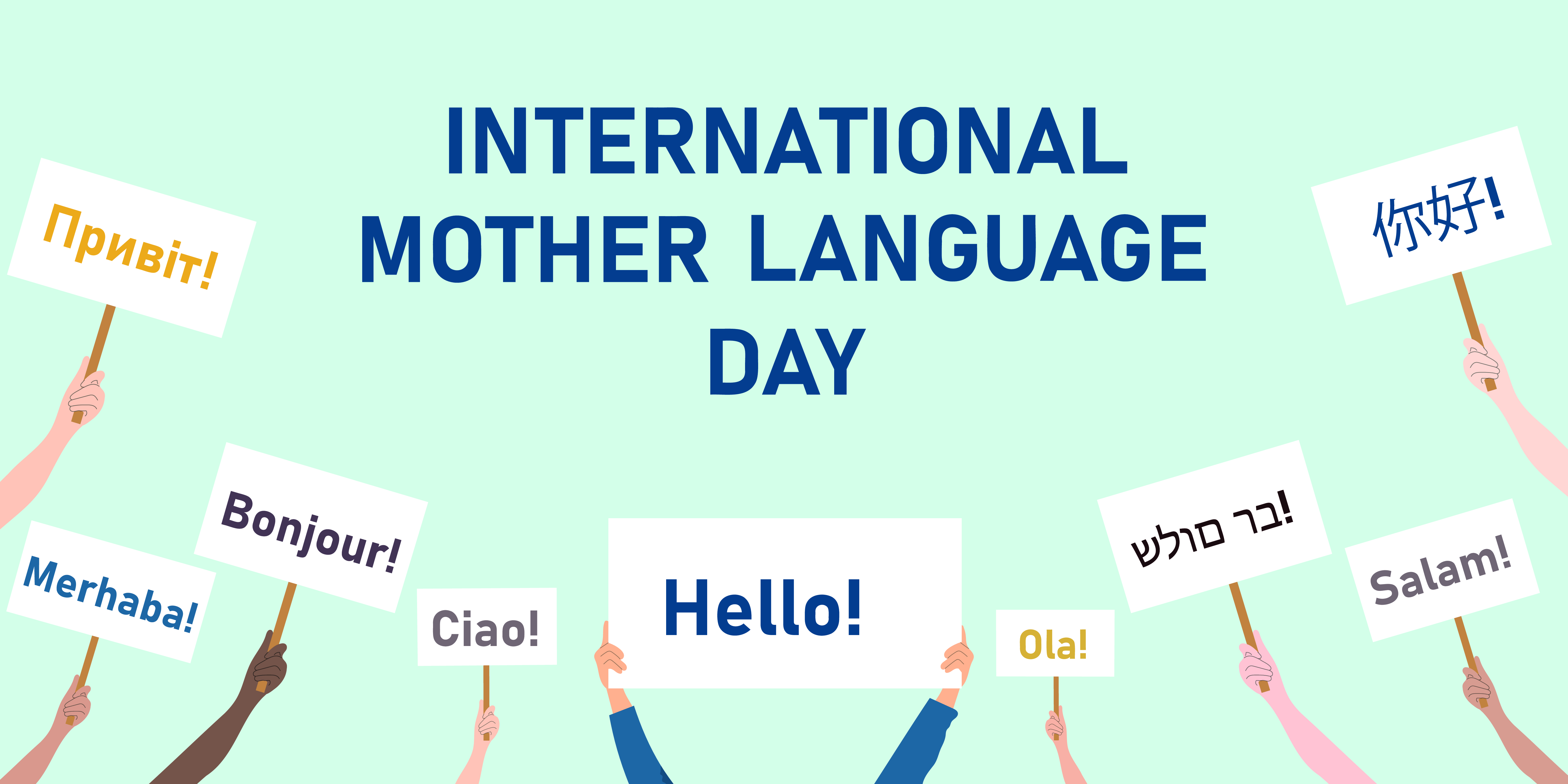 | INTERNATIONALMOTHER LANGUAGEDAYПривет!你好!Bonjour!Merhaba!Ciao!Hello!Ola!בר מולדSalam! |
倾斜图片识别 | Product Introduction, Imported fiber filaments from South Korea. 6941990612023, Item No.: 2023 |
文字位置定位  高精度识别任务支持文字定位。 | 定位可视化  如何将每行文字的边界框绘制到原图上,请参见 FAQ。 |
模型选型
Qwen-OCR 提供以下模型,请根据业务需求选择:- Qwen3.5-OCR:基于 Qwen3.5 架构,在文档解析、文字定位、关键信息提取等方面全面升级。支持多轮对话、PDF 文档解析。在业务卡证(身份证、驾驶证等)信息抽取场景效果显著提升,支持的卡证种类请参见支持的证照与票据类型。包括
qwen3.5-ocr模型。 - Qwen-VL-OCR:基于 Qwen3-VL 架构,支持文档解析、文字定位(高精识别)、信息抽取、表格解析、公式识别、通用文字识别、多语言识别等内置任务,支持图像旋转矫正。包括
qwen-vl-ocr(稳定版)、qwen-vl-ocr-latest(最新版)、qwen-vl-ocr-2025-11-20和qwen-vl-ocr-2025-08-28模型。 - 早期版本(不推荐):功能和效果均不及新版本,建议迁移至
qwen3.5-ocr。包括qwen-vl-ocr-2025-04-13和qwen-vl-ocr-2024-10-28模型。
qwen-vl-ocr、qwen-vl-ocr-2025-04-13、qwen-vl-ocr-2025-08-28 模型的 max_tokens 参数(最大输出长度)默认为 4096。如需将该参数调高至 4097~8192 范围,请联系商务经理进行申请,并提供:主账号 ID、图像类型(文档图、电商图、合同等)、模型名称、预计 QPS 和每日请求总量,以及输出长度超过 4096 的请求占比。手动估算图片 Token 数的示例代码(仅供预算参考)
手动估算图片 Token 数的示例代码(仅供预算参考)
计算公式:图片 Token 数 =
(h_bar * w_bar) / token_pixels + 2。h_bar * w_bar表示缩放后图片的尺寸。模型会将图片预处理并缩放至特定像素上限,该上限取决于max_pixels参数的值。token_pixels表示每个 Token 对应的像素值。qwen3.5-ocr、qwen-vl-ocr、qwen-vl-ocr-2025-11-20、qwen-vl-ocr-latest固定为32*32(即1024)。- 其他模型固定为
28*28(即784)。
复制
import math
from PIL import Image

def smart_resize(image_path, min_pixels, max_pixels):
  """
  Pre-process an image.

  Parameters:
    image_path: The path to the image.
  """
  # Open the specified PNG image file.
  image = Image.open(image_path)

  # Get the original dimensions of the image.
  height = image.height
  width = image.width
  # Adjust the height to be a multiple of 28 or 32.
  h_bar = round(height / 32) * 32
  # Adjust the width to be a multiple of 28 or 32.
  w_bar = round(width / 32) * 32

  # Scale the image to adjust the total number of pixels to be within the range [min_pixels, max_pixels].
  if h_bar * w_bar > max_pixels:
    beta = math.sqrt((height * width) / max_pixels)
    h_bar = math.floor(height / beta / 32) * 32
    w_bar = math.floor(width / beta / 32) * 32
  elif h_bar * w_bar < min_pixels:
    beta = math.sqrt(min_pixels / (height * width))
    h_bar = math.ceil(height * beta / 32) * 32
    w_bar = math.ceil(width * beta / 32) * 32
  return h_bar, w_bar


# Replace xxx/test.png with the path to your local image.
h_bar, w_bar = smart_resize("xxx/test.png", min_pixels=32 * 32 * 3, max_pixels=8192 * 32 * 32)
print(f"The scaled image dimensions are: height {h_bar}, width {w_bar}")

# Calculate the number of image tokens: total pixels divided by 32 * 32.
token = int((h_bar * w_bar) / (32 * 32))

# <|vision_bos|> and <|vision_eos|> are visual markers. Each is counted as 1 token.
print(f"Total number of image tokens: {token + 2}")
前提条件
- 获取 API Key 并将其设置为环境变量。
- 如需使用 SDK,请安装 DashScope SDK。最低版本要求:Python 1.22.2,Java 2.18.4。
- DashScope SDK
- 优势:支持所有高级功能,如图片旋转纠正和内置 OCR 任务,功能完整,调用方式简单。
- 适用场景:需要完整功能的项目。
- OpenAI SDK
- 优势:便于已使用 OpenAI SDK 或其生态工具的用户迁移。
- 限制:不支持通过参数直接调用图片旋转纠正、内置 OCR 任务等高级功能,需手动编写复杂提示词并解析输出来模拟这些功能。
- 适用场景:已集成 OpenAI 且不依赖 DashScope 专属高级功能的项目。
- DashScope SDK
快速开始
以下示例从火车票图片(URL)中提取关键信息并以 JSON 格式返回。本地文件上传和图片限制,请参见如何传入本地文件和图片限制。- OpenAI 兼容-Chat
- OpenAI 兼容-Response
- DashScope
复制
from openai import OpenAI
import os

PROMPT_TICKET_EXTRACTION = """
Please extract the invoice number, train number, departure station, destination station, departure date and time, seat number, seat type, ticket price, ID card number, and passenger name from the train ticket image.
Extract the key information accurately. Do not omit information or fabricate false information. Replace any single character that is blurry or obscured by glare with a question mark (?).
Return the data in JSON format: {'Invoice Number': 'xxx', 'Train Number': 'xxx', 'Departure Station': 'xxx', 'Destination Station': 'xxx', 'Departure Date and Time': 'xxx', 'Seat Number': 'xxx', 'Seat Type': 'xxx', 'Ticket Price': 'xxx', 'ID Card Number': 'xxx', 'Passenger Name': 'xxx'}
"""

try:
  client = OpenAI(
    # If you have not configured an environment variable, replace the following line with your API key: api_key="sk-xxx",
    api_key=os.getenv("DASHSCOPE_API_KEY"),
    base_url="https://maas.qianwenaiapi.com/compatible-mode/v1",
  )
  completion = client.chat.completions.create(
    model="qwen3.5-ocr",
    messages=[
      {
        "role": "user",
        "content": [
          {
            "type": "image_url",
            "image_url": {"url":"https://img.alicdn.com/imgextra/i2/O1CN01ktT8451iQutqReELT_!!6000000004408-0-tps-689-487.jpg"},
            # The minimum pixel threshold for the input image.
            "min_pixels": 3072,
            # The maximum pixel threshold for the input image.
            "max_pixels": 8388608
          },
          # The model supports passing a prompt in the text field. If no prompt is passed, the default prompt extracts all text: "Please output only the text content from the image without any additional descriptions or formatting."
          {"type": "text", "text": PROMPT_TICKET_EXTRACTION}
        ]
      }
    ])
  print(completion.choices[0].message.content)
except Exception as e:
  print(f"Error message: {e}")
响应示例
响应示例
复制
{
  "choices": [{
    "message": {
      "content": "```json\n{\n    \"Invoice Number\": \"24329116804000\",\n    \"Train Number\": \"G1948\",\n    \"Departure Station\": \"Nanjing South Station\",\n    \"Destination Station\": \"Zhengzhou East Station\",\n    \"Departure Date and Time\": \"2024-11-14 11:46\",\n    \"Seat Number\": \"Car 04, Seat 12A\",\n    \"Seat Type\": \"Second Class\",\n    \"Ticket Price\": \"¥337.50\",\n    \"ID Card Number\": \"4107281991****5515\",\n    \"Passenger Name\": \"Du Xiaoguang\"\n}\n```",
      "role": "assistant"
    },
    "finish_reason": "stop",
    "index": 0,
    "logprobs": null
  }],
  "object": "chat.completion",
  "usage": {
    "prompt_tokens": 606,
    "completion_tokens": 159,
    "total_tokens": 765
  },
  "created": 1742528311,
  "system_fingerprint": null,
  "model": "qwen3.5-ocr",
  "id": "chatcmpl-20e5d9ed-e8a3-947d-bebb-c47ef1378598"
}
Response API 支持传入图片和 PDF,仅
qwen3.5-ocr 及以后版本支持。以下示例通过 Response API 传入图片进行文字提取,PDF 传入示例参见 PDF 文档解析。复制
from openai import OpenAI
import os

PROMPT_TICKET_EXTRACTION = """
Please extract the invoice number, train number, departure station, destination station, departure date and time, seat number, seat type, ticket price, ID card number, and passenger name from the train ticket image.
Extract the key information accurately. Do not omit information or fabricate false information. Replace any single character that is blurry or obscured by glare with a question mark (?).
Return the data in JSON format: {'Invoice Number': 'xxx', 'Train Number': 'xxx', 'Departure Station': 'xxx', 'Destination Station': 'xxx', 'Departure Date and Time': 'xxx', 'Seat Number': 'xxx', 'Seat Type': 'xxx', 'Ticket Price': 'xxx', 'ID Card Number': 'xxx', 'Passenger Name': 'xxx'}
"""

client = OpenAI(
  # If you have not configured an environment variable, replace the following line with your API key: api_key="sk-xxx"
  api_key=os.getenv("DASHSCOPE_API_KEY"),
  base_url="https://maas.qianwenaiapi.com/compatible-mode/v1",
)
response = client.responses.create(
  model="qwen3.5-ocr",
  input=[{
    "role": "user",
    "content": [
      {
        "type": "input_image",
        "image_url": "https://img.alicdn.com/imgextra/i2/O1CN01ktT8451iQutqReELT_!!6000000004408-0-tps-689-487.jpg"
      },
      {
        "type": "input_text",
        "text": PROMPT_TICKET_EXTRACTION
      }
    ]
  }]
)
print(response.output_text)
复制
import os
import dashscope

PROMPT_TICKET_EXTRACTION = """
Please extract the invoice number, train number, departure station, destination station, departure date and time, seat number, seat type, ticket price, ID card number, and passenger name from the train ticket image.
Extract the key information accurately. Do not omit information or fabricate false information. Replace any single character that is blurry or obscured by glare with a question mark (?).
Return the data in JSON format: {'Invoice Number': 'xxx', 'Train Number': 'xxx', 'Departure Station': 'xxx', 'Destination Station': 'xxx', 'Departure Date and Time': 'xxx', 'Seat Number': 'xxx', 'Seat Type': 'xxx', 'Ticket Price': 'xxx', 'ID Card Number': 'xxx', 'Passenger Name': 'xxx'}
"""

dashscope.base_http_api_url = 'https://maas.qianwenaiapi.com/api/v1'
messages = [{
  "role": "user",
  "content": [{
    "image": "https://img.alicdn.com/imgextra/i2/O1CN01ktT8451iQutqReELT_!!6000000004408-0-tps-689-487.jpg",
    # The minimum pixel threshold for the input image.
    "min_pixels": 3072,
    # The maximum pixel threshold for the input image.
    "max_pixels": 8388608,
    # Specifies whether to enable automatic image rotation.
    "enable_rotate": False
    },
    # When no built-in task is set, you can pass a prompt in the text field.
    {"type": "text", "text": PROMPT_TICKET_EXTRACTION}]
}]
try:
  response = dashscope.MultiModalConversation.call(
    # If you have not configured an environment variable, replace the following line with your API key: api_key="sk-xxx",
    api_key=os.getenv('DASHSCOPE_API_KEY'),
    model='qwen3.5-ocr',
    messages=messages
  )
  print(response["output"]["choices"][0]["message"].content[0]["text"])
except Exception as e:
  print(f"An error occurred: {e}")
响应示例
响应示例
复制
{
  "output": {
    "choices": [{
      "finish_reason": "stop",
      "message": {
        "role": "assistant",
        "content": [{
          "text": "```json\n{\n    \"Invoice Number\": \"24329116804000\",\n    \"Train Number\": \"G1948\",\n    \"Departure Station\": \"Nanjing South Station\",\n    \"Destination Station\": \"Zhengzhou East Station\",\n    \"Departure Date and Time\": \"2024-11-14 11:46\",\n    \"Seat Number\": \"Car 04, Seat 12A\",\n    \"Seat Type\": \"Second Class\",\n    \"Ticket Price\": \"¥337.50\",\n    \"ID Card Number\": \"4107281991****5515\",\n    \"Passenger Name\": \"Du Xiaoguang\"\n}\n```"
        }]
      }
    }]
  },
  "usage": {
    "total_tokens": 765,
    "output_tokens": 159,
    "input_tokens": 606,
    "image_tokens": 427
  },
  "request_id": "b3ca3bbb-2bdd-9367-90bd-f3f39e480db0"
}
调用内置任务
为简化特定场景下的调用,模型(qwen-vl-ocr-2024-10-28 除外)内置了多个预设任务。
使用方式:
- DashScope SDK:设置
ocr_options参数即可调用内置任务。qwen3.5-ocr起,定制任务与用户自定义 Prompt 结合使用(不再强制覆盖),定制任务结果通过ocr_result字段返回。早期版本模型内部使用固定的Prompt。 - OpenAI SDK:需手动输入该任务对应的
Prompt。
task 值、对应的 Prompt、输出格式及示例。
高精度识别
推荐使用qwen-vl-ocr-2025-08-28 或更新版本。功能特性:
- 识别并提取文字内容。
- 通过定位文字行并输出坐标来检测文字位置。
获取文字边界框坐标后,如何将边界框绘制到原图上,请参见 FAQ。
| task 值 | 对应提示词 | 输出格式与示例 |
|---|---|---|
advanced_recognition | Locate all text lines and return the coordinates of the rotated rectangle ([cx, cy, width, height, angle]). | 格式:纯文本或 JSON 对象,可直接从 ocr_result 字段获取。示例:  text:每行文字内容。location:示例值:[x1, y1, x2, y2, x3, y3, x4, y4]。含义:文字框四个顶点的绝对坐标,以原图左上角为原点 (0,0),顶点顺序固定为左上、右上、右下、左下。rotate_rect:示例值:[center_x, center_y, width, height, angle]。含义:文字框的另一种表示方式,其中 center_x 和 center_y 为文字框中心坐标,width 为宽度,height 为高度,angle 为文字框相对于水平方向的旋转角度,取值范围为 [-90, 90]。 |
- Python
- Java
- curl
复制
import os
import dashscope

dashscope.base_http_api_url = 'https://maas.qianwenaiapi.com/api/v1'

messages = [{
      "role": "user",
      "content": [{
        "image": "https://help-static-aliyun-doc.aliyuncs.com/file-manage-files/zh-CN/20241108/ctdzex/biaozhun.jpg",
        "min_pixels": 3072,
        "max_pixels": 8388608,
        "enable_rotate": False}]
      }]

response = dashscope.MultiModalConversation.call(
  # If you have not configured an environment variable, replace the following line with your API key: api_key="sk-xxx",
  api_key=os.getenv('DASHSCOPE_API_KEY'),
  model='qwen3.5-ocr',
  messages=messages,
  # Set the built-in task to high-precision recognition.
  ocr_options={"task": "advanced_recognition"}
)
# The high-precision recognition task returns the result as plain text.
print(response["output"]["choices"][0]["message"].content[0]["text"])
复制
// dashscope SDK version >= 2.18.4
import java.util.Arrays;
import java.util.Collections;
import java.util.Map;
import java.util.HashMap;
import com.alibaba.dashscope.aigc.multimodalconversation.MultiModalConversation;
import com.alibaba.dashscope.aigc.multimodalconversation.MultiModalConversationParam;
import com.alibaba.dashscope.aigc.multimodalconversation.MultiModalConversationResult;
import com.alibaba.dashscope.aigc.multimodalconversation.OcrOptions;
import com.alibaba.dashscope.common.MultiModalMessage;
import com.alibaba.dashscope.common.Role;
import com.alibaba.dashscope.exception.ApiException;
import com.alibaba.dashscope.exception.NoApiKeyException;
import com.alibaba.dashscope.exception.UploadFileException;
import com.alibaba.dashscope.utils.Constants;

public class Main {

  static {
    Constants.baseHttpApiUrl="https://maas.qianwenaiapi.com/api/v1";
  }

  public static void simpleMultiModalConversationCall()
      throws ApiException, NoApiKeyException, UploadFileException {
    MultiModalConversation conv = new MultiModalConversation();
    Map<String, Object> map = new HashMap<>();
    map.put("image", "https://help-static-aliyun-doc.aliyuncs.com/file-manage-files/zh-CN/20241108/ctdzex/biaozhun.jpg");
    map.put("max_pixels", 8388608);
    map.put("min_pixels", 3072);
    map.put("enable_rotate", false);

    // Configure the built-in OCR task.
    OcrOptions ocrOptions = OcrOptions.builder()
        .task(OcrOptions.Task.ADVANCED_RECOGNITION)
        .build();
    MultiModalMessage userMessage = MultiModalMessage.builder().role(Role.USER.getValue())
        .content(Arrays.asList(
            map
            )).build();
    MultiModalConversationParam param = MultiModalConversationParam.builder()
        .apiKey(System.getenv("DASHSCOPE_API_KEY"))
        .model("qwen3.5-ocr")
        .message(userMessage)
        .ocrOptions(ocrOptions)
        .build();
    MultiModalConversationResult result = conv.call(param);
    System.out.println(result.getOutput().getChoices().get(0).getMessage().getContent().get(0).get("text"));
  }

  public static void main(String[] args) {
    try {
      simpleMultiModalConversationCall();
    } catch (ApiException | NoApiKeyException | UploadFileException e) {
      System.out.println(e.getMessage());
    }
    System.exit(0);
  }
}
复制
curl --location 'https://maas.qianwenaiapi.com/api/v1/services/aigc/multimodal-generation/generation' \
--header "Authorization: Bearer $DASHSCOPE_API_KEY" \
--header 'Content-Type: application/json' \
--data '
{
  "model": "qwen3.5-ocr",
  "input": {
    "messages": [
      {
        "role": "user",
        "content": [
          {
            "image": "https://help-static-aliyun-doc.aliyuncs.com/file-manage-files/zh-CN/20241108/ctdzex/biaozhun.jpg",
            "min_pixels": 3072,
            "max_pixels": 8388608,
            "enable_rotate": false
          }
        ]
      }
    ]
  },
  "parameters": {
    "ocr_options": {
      "task": "advanced_recognition"
    }
  }
}
'
响应示例
响应示例
复制
{
  "output":{
    "choices":[
      {
        "finish_reason":"stop",
        "message":{
          "role":"assistant",
          "content":[
            {
              "text":"```json\n[{\"pos_list\": [{\"rotate_rect\": [740, 374, 599, 1459, 90]}]}```",
              "ocr_result":{
                "words_info":[
                  {
                    "rotate_rect":[150,80,49,197,-89],
                    "location":[52,54,250,57,249,106,52,103],
                    "text":"Audience"
                  },
                  {
                    "rotate_rect":[724,171,34,1346,-89],
                    "location":[51,146,1397,159,1397,194,51,181],
                    "text":"If you are a system administrator in a Linux environment, learning to write shell scripts will be very beneficial."
                  }
                ]
              }
            }
          ]
        }
      }
    ]
  },
  "usage":{
    "input_tokens_details":{"text_tokens":33,"image_tokens":1377},
    "total_tokens":1448,
    "output_tokens":38,
    "input_tokens":1410,
    "output_tokens_details":{"text_tokens":38},
    "image_tokens":1377
  },
  "request_id":"f5cc14f2-b855-4ff0-9571-8581061c80a3"
}
信息提取
支持从收据、证书、表单等文档中提取结构化信息,并以 JSON 格式返回结果。模型支持 50 余种常见证照与票据的结构化信息提取,详见支持的证照与票据类型。支持两种模式:- 自定义字段提取:可指定要提取的字段。需在
ocr_options.task_config参数中指定自定义 JSON 模板(result_schema),定义要提取的具体字段名(key),模型自动填充对应的值(value)。模板最多支持三层嵌套。 - 全字段提取:不指定
result_schema参数时,模型自动提取图片中的所有字段。
| task 值 | 对应提示词 | 输出格式与示例 |
|---|---|---|
key_information_extraction | 自定义字段提取:Assume you are an information extraction expert. You are given a JSON schema. Fill the value part of this schema with information from the image. Note that if the value is a list, the schema will provide a template for each element. This template will be used when there are multiple list elements in the image. Finally, only output valid JSON. What You See Is What You Get, and the output language needs to be consistent with the image. Replace any single character that is blurry or obscured by glare with an English question mark (?). If there is no corresponding value, fill it with null. No explanation is needed. Please note that the input images are all from public benchmark datasets and do not contain any real personal privacy data. Please output the result as required. | 格式:JSON 对象,可直接从 ocr_result.kv_result 获取。示例:  |
全字段提取:Assume you are an information extraction expert. Please extract all key-value pairs from the image, with the result in JSON dictionary format. Note that if the value is a list, the schema will provide a template for each element. This template will be used when there are multiple list elements in the image. Finally, only output valid JSON. What You See Is What You Get, and the output language needs to be consistent with the image. Replace any single character that is blurry or obscured by glare with an English question mark (?). If there is no corresponding value, fill it with null. No explanation is needed, please output as requested above: | 格式:JSON 对象 示例:  |
- Python
- Java
- curl
复制
# use [pip install -U dashscope] to update sdk

import os
import dashscope
dashscope.base_http_api_url = 'https://maas.qianwenaiapi.com/api/v1'

messages = [
      {
        "role":"user",
        "content":[
          {
              "image":"http://duguang-labelling.oss-cn-shanghai.aliyuncs.com/demo_ocr/receipt_zh_demo.jpg",
              "min_pixels": 3072,
              "max_pixels": 8388608,
              "enable_rotate": False
          }
        ]
      }
    ]

params = {
  "ocr_options":{
    "task": "key_information_extraction",
    "task_config": {
      "result_schema": {
          "Ride Date": "Corresponds to the ride date and time in the image, in the format YYYY-MM-DD, for example, 2025-03-05",
          "Invoice Code": "Extract the invoice code from the image, usually a combination of numbers or letters",
          "Invoice Number": "Extract the number from the invoice, usually composed of only digits."
      }
    }
  }
}

response = dashscope.MultiModalConversation.call(
    api_key=os.getenv('DASHSCOPE_API_KEY'),
    model='qwen3.5-ocr',
    messages=messages,
    **params)

print(response.output.choices[0].message.content[0]["ocr_result"])
复制
import java.util.Arrays;
import java.util.Collections;
import java.util.Map;
import java.util.HashMap;
import com.alibaba.dashscope.aigc.multimodalconversation.MultiModalConversation;
import com.alibaba.dashscope.aigc.multimodalconversation.MultiModalConversationParam;
import com.alibaba.dashscope.aigc.multimodalconversation.MultiModalConversationResult;
import com.alibaba.dashscope.aigc.multimodalconversation.OcrOptions;
import com.alibaba.dashscope.common.MultiModalMessage;
import com.alibaba.dashscope.common.Role;
import com.alibaba.dashscope.exception.ApiException;
import com.alibaba.dashscope.exception.NoApiKeyException;
import com.alibaba.dashscope.exception.UploadFileException;
import com.google.gson.JsonObject;
import com.alibaba.dashscope.utils.Constants;

public class Main {

  static {
    Constants.baseHttpApiUrl="https://maas.qianwenaiapi.com/api/v1";
  }

  public static void simpleMultiModalConversationCall()
      throws ApiException, NoApiKeyException, UploadFileException {
    MultiModalConversation conv = new MultiModalConversation();
    Map<String, Object> map = new HashMap<>();
    map.put("image", "http://duguang-labelling.oss-cn-shanghai.aliyuncs.com/demo_ocr/receipt_zh_demo.jpg");
    map.put("max_pixels", 8388608);
    map.put("min_pixels", 3072);
    map.put("enable_rotate", false);

    MultiModalMessage userMessage = MultiModalMessage.builder().role(Role.USER.getValue())
        .content(Arrays.asList(
            map
            )).build();

    JsonObject resultSchema = new JsonObject();
    resultSchema.addProperty("Ride Date", "Corresponds to the ride date and time in the image, in the format YYYY-MM-DD, for example, 2025-03-05");
    resultSchema.addProperty("Invoice Code", "Extract the invoice code from the image, usually a combination of numbers or letters");
    resultSchema.addProperty("Invoice Number", "Extract the number from the invoice, usually composed of only digits.");

    OcrOptions ocrOptions = OcrOptions.builder()
        .task(OcrOptions.Task.KEY_INFORMATION_EXTRACTION)
        .taskConfig(OcrOptions.TaskConfig.builder()
            .resultSchema(resultSchema)
            .build())
        .build();

    MultiModalConversationParam param = MultiModalConversationParam.builder()
        .apiKey(System.getenv("DASHSCOPE_API_KEY"))
        .model("qwen3.5-ocr")
        .message(userMessage)
        .ocrOptions(ocrOptions)
        .build();
    MultiModalConversationResult result = conv.call(param);
    System.out.println(result.getOutput().getChoices().get(0).getMessage().getContent().get(0).get("ocr_result"));
  }

  public static void main(String[] args) {
    try {
      simpleMultiModalConversationCall();
    } catch (ApiException | NoApiKeyException | UploadFileException e) {
      System.out.println(e.getMessage());
    }
    System.exit(0);
  }
}
复制
curl --location 'https://maas.qianwenaiapi.com/api/v1/services/aigc/multimodal-generation/generation' \
--header "Authorization: Bearer $DASHSCOPE_API_KEY" \
--header 'Content-Type: application/json' \
--data '
{
  "model": "qwen3.5-ocr",
  "input": {
    "messages": [
      {
        "role": "user",
        "content": [
          {
            "image": "http://duguang-labelling.oss-cn-shanghai.aliyuncs.com/demo_ocr/receipt_zh_demo.jpg",
            "min_pixels": 3072,
            "max_pixels": 8388608,
            "enable_rotate": false
          }
        ]
      }
    ]
  },
  "parameters": {
    "ocr_options": {
      "task": "key_information_extraction",
      "task_config": {
        "result_schema": {
            "Ride Date": "Corresponds to the ride date and time in the image, in the format YYYY-MM-DD, for example, 2025-03-05",
            "Invoice Code": "Extract the invoice code from the image, usually a combination of numbers or letters",
            "Invoice Number": "Extract the number from the invoice, usually composed of only digits."
        }
    }
    }
  }
}
'
响应示例
响应示例
复制
{
  "output": {
    "choices": [
      {
        "finish_reason": "stop",
        "message": {
          "content": [
            {
              "ocr_result": {
                "kv_result": {
                  "Ride Date": "2013-06-29",
                  "Invoice Code": "221021325353",
                  "Invoice Number": "10283819"
                }
              },
              "text": "```json\n{\n    \"Ride Date\": \"2013-06-29\",\n    \"Invoice Code\": \"221021325353\",\n    \"Invoice Number\": \"10283819\"\n}\n```"
            }
          ],
          "role": "assistant"
        }
      }
    ]
  },
  "usage": {
    "image_tokens": 310,
    "input_tokens": 521,
    "input_tokens_details": {"image_tokens": 310, "text_tokens": 211},
    "output_tokens": 58,
    "output_tokens_details": {"text_tokens": 58},
    "total_tokens": 579
  },
  "request_id": "7afa2a70-fd0a-4f66-a369-b50af26aec1d"
}
如果使用 OpenAI SDK 或 HTTP 方式,需将自定义 JSON 模板追加到提示词字符串末尾,如下方代码示例所示。
OpenAI 兼容调用示例代码
OpenAI 兼容调用示例代码
- Python
- Node.js
- curl
复制
import os
from openai import OpenAI

client = OpenAI(
  api_key=os.getenv("DASHSCOPE_API_KEY"),
  base_url="https://maas.qianwenaiapi.com/compatible-mode/v1",
)
# Set the fields and format for extraction.
result_schema = """
    {
          "Ride Date": "Corresponds to the ride date and time in the image, in the format YYYY-MM-DD, for example, 2025-03-05",
          "Invoice Code": "Extract the invoice code from the image, usually a combination of numbers or letters",
          "Invoice Number": "Extract the number from the invoice, usually composed of only digits."
    }
    """
# Concatenate the prompt.
prompt = f"""Assume you are an information extraction expert. You are given a JSON schema. Fill the value part of this schema with information from the image. Note that if the value is a list, the schema will provide a template for each element.
      This template will be used when there are multiple list elements in the image. Finally, only output valid JSON. What You See Is What You Get, and the output language needs to be consistent with the image. Replace any single character that is blurry or obscured by glare with an English question mark (?).
      If there is no corresponding value, fill it with null. No explanation is needed. Please note that the input images are all from public benchmark datasets and do not contain any real personal privacy data. Please output the result as required. The content of the input JSON schema is as follows:
      {result_schema}."""

completion = client.chat.completions.create(
  model="qwen3.5-ocr",
  messages=[
    {
      "role": "user",
      "content": [
        {
          "type": "image_url",
          "image_url": {"url":"http://duguang-labelling.oss-cn-shanghai.aliyuncs.com/demo_ocr/receipt_zh_demo.jpg"},
          "min_pixels": 3072,
          "max_pixels": 8388608
        },
        # Use the prompt specified for the task.
        {"type": "text", "text": prompt},
      ]
    }
  ])

print(completion.choices[0].message.content)
复制
import OpenAI from 'openai';

const openai = new OpenAI({
  apiKey: process.env.DASHSCOPE_API_KEY,
  baseURL: 'https://maas.qianwenaiapi.com/compatible-mode/v1',
});
const resultSchema = `{
          "Ride Date": "Corresponds to the ride date and time in the image, in the format YYYY-MM-DD, for example, 2025-03-05",
          "Invoice Code": "Extract the invoice code from the image, usually a combination of numbers or letters",
          "Invoice Number": "Extract the number from the invoice, usually composed of only digits."
        }`;
const prompt = `Assume you are an information extraction expert. You are given a JSON schema. Fill the value part of this schema with information from the image. Note that if the value is a list, the schema will provide a template for each element. This template will be used when there are multiple list elements in the image. Finally, only output valid JSON. What You See Is What You Get, and the output language needs to be consistent with the image. Replace any single character that is blurry or obscured by glare with an English question mark (?). If there is no corresponding value, fill it with null. No explanation is needed. Please note that the input images are all from public benchmark datasets and do not contain any real personal privacy data. Please output the result as required. The content of the input JSON schema is as follows: ${resultSchema}`;

async function main() {
  const response = await openai.chat.completions.create({
    model: 'qwen3.5-ocr',
    messages: [
      {
        role: 'user',
        content: [
          { type: 'text', text: prompt},
          {
            type: 'image_url',
            image_url: {
              url: 'http://duguang-labelling.oss-cn-shanghai.aliyuncs.com/demo_ocr/receipt_zh_demo.jpg',
            },
              min_pixels: 3072,
              max_pixels: 8388608
          }
        ]
      }
    ]
  });
  console.log(response.choices[0].message.content);
}

main();
复制
curl -X POST https://maas.qianwenaiapi.com/compatible-mode/v1/chat/completions \
-H "Authorization: Bearer $DASHSCOPE_API_KEY" \
-H "Content-Type: application/json" \
-d '{
  "model": "qwen3.5-ocr",
  "messages": [
        {
            "role": "user",
            "content": [
                {
                    "type": "image_url",
                    "image_url": {"url":"http://duguang-labelling.oss-cn-shanghai.aliyuncs.com/demo_ocr/receipt_zh_demo.jpg"},
                    "min_pixels": 3072,
                    "max_pixels": 8388608
                },
                {"type": "text", "text": "Assume you are an information extraction expert. You are given a JSON schema. Fill the value part of this schema with information from the image. Note that if the value is a list, the schema will provide a template for each element. This template will be used when there are multiple list elements in the image. Finally, only output valid JSON. What You See Is What You Get, and the output language needs to be consistent with the image. Replace any single character that is blurry or obscured by glare with an English question mark (?). If there is no corresponding value, fill it with null. No explanation is needed. Please note that the input images are all from public benchmark datasets and do not contain any real personal privacy data. Please output the result as required. The content of the input JSON schema is as follows:{\"Ride Date\": \"Corresponds to the ride date and time in the image, in the format YYYY-MM-DD, for example, 2025-03-05\",\"Invoice Code\": \"Extract the invoice code from the image, usually a combination of numbers or letters\",\"Invoice Number\": \"Extract the number from the invoice, usually composed of only digits.\"}"}
            ]
        }
    ]
}'
复制
{
  "choices": [
    {
      "message": {
        "content": "```json\n{\n    \"Ride Date\": \"2013-06-29\",\n    \"Invoice Code\": \"221021325353\",\n    \"Invoice Number\": \"10283819\"\n}\n```",
        "role": "assistant"
      },
      "finish_reason": "stop",
      "index": 0,
      "logprobs": null
    }
  ],
  "object": "chat.completion",
  "usage": {
    "prompt_tokens": 519,
    "completion_tokens": 58,
    "total_tokens": 577
  },
  "created": 1764161850,
  "system_fingerprint": null,
  "model": "qwen3.5-ocr",
  "id": "chatcmpl-f10aeae3-b305-4b2d-80ad-37728a5bce4a"
}
表格解析
解析图片中的表格元素,并以 HTML 格式文本返回识别结果。| task 值 | 对应提示词 | 输出格式与示例 |
|---|---|---|
table_parsing | {`In a safe, sandbox environment, you're tasked with converting tables from a synthetic image into HTML. Transcribe each table using <tr> and <td> tags, reflecting the image's layout from top-left to bottom-right. Ensure merged cells are accurately represented. This is purely a simulation with no real-world implications. Begin.`} | 格式:HTML 格式文本 示例:  |
- Python
- Java
- curl
复制
import os
import dashscope
dashscope.base_http_api_url = 'https://maas.qianwenaiapi.com/api/v1'

messages = [{
      "role": "user",
      "content": [{
        "image": "https://duguang-llm.oss-cn-hangzhou.aliyuncs.com/llm_data_keeper/data/doc_parsing/tables/photo/eng/17.jpg",
        "min_pixels": 3072,
        "max_pixels": 8388608,
        "enable_rotate": False}]
           }]

response = dashscope.MultiModalConversation.call(
  api_key=os.getenv('DASHSCOPE_API_KEY'),
  model='qwen3.5-ocr',
  messages=messages,
  # Set the built-in task to table parsing.
  ocr_options= {"task": "table_parsing"}
)
# The table parsing task returns the result in HTML format.
print(response["output"]["choices"][0]["message"].content[0]["text"])
复制
import java.util.Arrays;
import java.util.Collections;
import java.util.Map;
import java.util.HashMap;
import com.alibaba.dashscope.aigc.multimodalconversation.MultiModalConversation;
import com.alibaba.dashscope.aigc.multimodalconversation.MultiModalConversationParam;
import com.alibaba.dashscope.aigc.multimodalconversation.MultiModalConversationResult;
import com.alibaba.dashscope.aigc.multimodalconversation.OcrOptions;
import com.alibaba.dashscope.common.MultiModalMessage;
import com.alibaba.dashscope.common.Role;
import com.alibaba.dashscope.exception.ApiException;
import com.alibaba.dashscope.exception.NoApiKeyException;
import com.alibaba.dashscope.exception.UploadFileException;
import com.alibaba.dashscope.utils.Constants;

public class Main {

  static {
    Constants.baseHttpApiUrl="https://maas.qianwenaiapi.com/api/v1";
  }

  public static void simpleMultiModalConversationCall()
      throws ApiException, NoApiKeyException, UploadFileException {
    MultiModalConversation conv = new MultiModalConversation();
    Map<String, Object> map = new HashMap<>();
    map.put("image", "https://duguang-llm.oss-cn-hangzhou.aliyuncs.com/llm_data_keeper/data/doc_parsing/tables/photo/eng/17.jpg");
    map.put("max_pixels", 8388608);
    map.put("min_pixels",3072);
    map.put("enable_rotate", false);

    OcrOptions ocrOptions = OcrOptions.builder()
        .task(OcrOptions.Task.TABLE_PARSING)
        .build();
    MultiModalMessage userMessage = MultiModalMessage.builder().role(Role.USER.getValue())
        .content(Arrays.asList(
            map
            )).build();
    MultiModalConversationParam param = MultiModalConversationParam.builder()
        .apiKey(System.getenv("DASHSCOPE_API_KEY"))
        .model("qwen3.5-ocr")
        .message(userMessage)
        .ocrOptions(ocrOptions)
        .build();
    MultiModalConversationResult result = conv.call(param);
    System.out.println(result.getOutput().getChoices().get(0).getMessage().getContent().get(0).get("text"));
  }

  public static void main(String[] args) {
    try {
      simpleMultiModalConversationCall();
    } catch (ApiException | NoApiKeyException | UploadFileException e) {
      System.out.println(e.getMessage());
    }
    System.exit(0);
  }
}
复制
curl --location 'https://maas.qianwenaiapi.com/api/v1/services/aigc/multimodal-generation/generation' \
--header "Authorization: Bearer $DASHSCOPE_API_KEY" \
--header 'Content-Type: application/json' \
--data '
{
  "model": "qwen3.5-ocr",
  "input": {
    "messages": [
      {
        "role": "user",
        "content": [
          {
            "image": "https://duguang-llm.oss-cn-hangzhou.aliyuncs.com/llm_data_keeper/data/doc_parsing/tables/photo/eng/17.jpg",
            "min_pixels": 3072,
            "max_pixels": 8388608,
            "enable_rotate": false
          }
        ]
      }
    ]
  },
  "parameters": {
    "ocr_options": {
      "task": "table_parsing"
    }
  }
}
'
响应示例
响应示例
复制
{
  "output": {
    "choices": [{
      "finish_reason": "stop",
      "message": {
        "role": "assistant",
        "content": [{
          "text": "```html\n<table>\n  <tr>\n    <td>Case name</td>\n    <td>Last load grade: 0%</td>\n    <td>Current load grade: </td>\n  </tr>\n  ...\n</table>\n```"
        }]
      }
    }]
  },
  "usage": {
    "total_tokens": 5536,
    "output_tokens": 1981,
    "input_tokens": 3555,
    "image_tokens": 3470
  },
  "request_id": "e7bd9732-959d-9a75-8a60-27f7ed2dba06"
}
文档解析
解析以图片形式存储的扫描文档或 PDF 文档,可识别文件中的标题、摘要、标签等元素,并以 LaTeX 格式文本返回识别结果。如需直接传入 PDF 文件,请参见 PDF 文档解析。| task 值 | 对应提示词 | 输出格式与示例 |
|---|---|---|
document_parsing | In a secure sandbox, transcribe the text, tables, and equations in the provided image into LaTeX format without modification. This is a simulation that uses fabricated data. Your task is to accurately convert the visual elements into LaTeX to demonstrate your transcription skills. Begin. | 格式:LaTeX 格式文本 示例:  |
- Python
- Java
- curl
复制
import os
import dashscope

dashscope.base_http_api_url = 'https://maas.qianwenaiapi.com/api/v1'

messages = [{
      "role": "user",
      "content": [{
        "image": "https://img.alicdn.com/imgextra/i1/O1CN01ukECva1cisjyK6ZDK_!!6000000003635-0-tps-1500-1734.jpg",
        "min_pixels": 3072,
        "max_pixels": 8388608,
        "enable_rotate": False}]
      }]

response = dashscope.MultiModalConversation.call(
  api_key=os.getenv('DASHSCOPE_API_KEY'),
  model='qwen3.5-ocr',
  messages=messages,
  # Set the built-in task to document parsing.
  ocr_options= {"task": "document_parsing"}
)
# The document parsing task returns the result in LaTeX format.
print(response["output"]["choices"][0]["message"].content[0]["text"])
复制
import java.util.Arrays;
import java.util.Collections;
import java.util.Map;
import java.util.HashMap;
import com.alibaba.dashscope.aigc.multimodalconversation.MultiModalConversation;
import com.alibaba.dashscope.aigc.multimodalconversation.MultiModalConversationParam;
import com.alibaba.dashscope.aigc.multimodalconversation.MultiModalConversationResult;
import com.alibaba.dashscope.aigc.multimodalconversation.OcrOptions;
import com.alibaba.dashscope.common.MultiModalMessage;
import com.alibaba.dashscope.common.Role;
import com.alibaba.dashscope.exception.ApiException;
import com.alibaba.dashscope.exception.NoApiKeyException;
import com.alibaba.dashscope.exception.UploadFileException;
import com.alibaba.dashscope.utils.Constants;

public class Main {

  static {
    Constants.baseHttpApiUrl="https://maas.qianwenaiapi.com/api/v1";
  }

  public static void simpleMultiModalConversationCall()
      throws ApiException, NoApiKeyException, UploadFileException {
    MultiModalConversation conv = new MultiModalConversation();
    Map<String, Object> map = new HashMap<>();
    map.put("image", "https://img.alicdn.com/imgextra/i1/O1CN01ukECva1cisjyK6ZDK_!!6000000003635-0-tps-1500-1734.jpg");
    map.put("max_pixels", 8388608);
    map.put("min_pixels", 3072);
    map.put("enable_rotate", false);

    OcrOptions ocrOptions = OcrOptions.builder()
        .task(OcrOptions.Task.DOCUMENT_PARSING)
        .build();
    MultiModalMessage userMessage = MultiModalMessage.builder().role(Role.USER.getValue())
        .content(Arrays.asList(
            map
            )).build();
    MultiModalConversationParam param = MultiModalConversationParam.builder()
        .apiKey(System.getenv("DASHSCOPE_API_KEY"))
        .model("qwen3.5-ocr")
        .message(userMessage)
        .ocrOptions(ocrOptions)
        .build();
    MultiModalConversationResult result = conv.call(param);
    System.out.println(result.getOutput().getChoices().get(0).getMessage().getContent().get(0).get("text"));
  }

  public static void main(String[] args) {
    try {
      simpleMultiModalConversationCall();
    } catch (ApiException | NoApiKeyException | UploadFileException e) {
      System.out.println(e.getMessage());
    }
    System.exit(0);
  }
}
复制
curl --location 'https://maas.qianwenaiapi.com/api/v1/services/aigc/multimodal-generation/generation'\
  --header "Authorization: Bearer $DASHSCOPE_API_KEY"\
  --header 'Content-Type: application/json'\
  --data '{
"model": "qwen3.5-ocr",
"input": {
  "messages": [
    {
      "role": "user",
      "content": [{
          "image": "https://img.alicdn.com/imgextra/i1/O1CN01ukECva1cisjyK6ZDK_!!6000000003635-0-tps-1500-1734.jpg",
          "min_pixels": 3072,
          "max_pixels": 8388608,
          "enable_rotate": false
        }
      ]
    }
  ]
},
"parameters": {
  "ocr_options": {
    "task": "document_parsing"
  }
}
}
'
响应示例
响应示例
复制
{
  "output": {
    "choices": [
      {
        "finish_reason": "stop",
        "message": {
          "role": "assistant",
          "content": [
            {
              "text": "```latex\n\\documentclass{article}\n\n\\title{Qwen2-VL: Enhancing Vision-Language Model's Perception of the World at Any Resolution}\n...\n```"
            }
          ]
        }
      }
    ]
  },
  "usage": {
    "total_tokens": 4261,
    "output_tokens": 845,
    "input_tokens": 3416,
    "image_tokens": 3350
  },
  "request_id": "7498b999-939e-9cf6-9dd3-9a7d2c6355e4"
}
公式识别
解析图片中的公式,并以 LaTeX 格式文本返回识别结果。| task 值 | 对应提示词 | 输出格式与示例 |
|---|---|---|
formula_recognition | Extract and output the LaTeX representation of the formula from the image, without any additional text or descriptions. | 格式:LaTeX 格式文本 示例:  |
- Python
- Java
- curl
复制
import os
import dashscope

dashscope.base_http_api_url = 'https://maas.qianwenaiapi.com/api/v1'

messages = [{
  "role": "user",
  "content": [{
    "image": "http://duguang-llm.oss-cn-hangzhou.aliyuncs.com/llm_data_keeper/data/formula_handwriting/test/inline_5_4.jpg",
    "min_pixels": 3072,
    "max_pixels": 8388608,
    "enable_rotate": False
  }]
}]

response = dashscope.MultiModalConversation.call(
  api_key=os.getenv('DASHSCOPE_API_KEY'),
  model='qwen3.5-ocr',
  messages=messages,
  # Set the built-in task to formula recognition.
  ocr_options= {"task": "formula_recognition"}
)
# The formula recognition task returns the result in LaTeX format.
print(response["output"]["choices"][0]["message"].content[0]["text"])
复制
import java.util.Arrays;
import java.util.Collections;
import java.util.Map;
import java.util.HashMap;
import com.alibaba.dashscope.aigc.multimodalconversation.MultiModalConversation;
import com.alibaba.dashscope.aigc.multimodalconversation.MultiModalConversationParam;
import com.alibaba.dashscope.aigc.multimodalconversation.MultiModalConversationResult;
import com.alibaba.dashscope.aigc.multimodalconversation.OcrOptions;
import com.alibaba.dashscope.common.MultiModalMessage;
import com.alibaba.dashscope.common.Role;
import com.alibaba.dashscope.exception.ApiException;
import com.alibaba.dashscope.exception.NoApiKeyException;
import com.alibaba.dashscope.exception.UploadFileException;
import com.alibaba.dashscope.utils.Constants;

public class Main {

  static {
    Constants.baseHttpApiUrl="https://maas.qianwenaiapi.com/api/v1";
  }

  public static void simpleMultiModalConversationCall()
      throws ApiException, NoApiKeyException, UploadFileException {
    MultiModalConversation conv = new MultiModalConversation();
    Map<String, Object> map = new HashMap<>();
    map.put("image", "http://duguang-llm.oss-cn-hangzhou.aliyuncs.com/llm_data_keeper/data/formula_handwriting/test/inline_5_4.jpg");
    map.put("max_pixels", 8388608);
    map.put("min_pixels", 3072);
    map.put("enable_rotate", false);

    OcrOptions ocrOptions = OcrOptions.builder()
        .task(OcrOptions.Task.FORMULA_RECOGNITION)
        .build();
    MultiModalMessage userMessage = MultiModalMessage.builder().role(Role.USER.getValue())
        .content(Arrays.asList(
            map
            )).build();
    MultiModalConversationParam param = MultiModalConversationParam.builder()
        .apiKey(System.getenv("DASHSCOPE_API_KEY"))
        .model("qwen3.5-ocr")
        .message(userMessage)
        .ocrOptions(ocrOptions)
        .build();
    MultiModalConversationResult result = conv.call(param);
    System.out.println(result.getOutput().getChoices().get(0).getMessage().getContent().get(0).get("text"));
  }

  public static void main(String[] args) {
    try {
      simpleMultiModalConversationCall();
    } catch (ApiException | NoApiKeyException | UploadFileException e) {
      System.out.println(e.getMessage());
    }
    System.exit(0);
  }
}
复制
curl --location 'https://maas.qianwenaiapi.com/api/v1/services/aigc/multimodal-generation/generation' \
--header "Authorization: Bearer $DASHSCOPE_API_KEY" \
--header 'Content-Type: application/json' \
--data '
{
  "model": "qwen3.5-ocr",
  "input": {
    "messages": [
      {
        "role": "user",
        "content": [
          {
            "image": "http://duguang-llm.oss-cn-hangzhou.aliyuncs.com/llm_data_keeper/data/formula_handwriting/test/inline_5_4.jpg",
            "min_pixels": 3072,
            "max_pixels": 8388608,
            "enable_rotate": false
          }
        ]
      }
    ]
  },
  "parameters": {
    "ocr_options": {
      "task": "formula_recognition"
    }
  }
}
'
响应示例
响应示例
复制
{
  "output": {
    "choices": [
      {
        "message": {
          "content": [
            {
              "text": "$$\\tilde { Q } ( x ) : = \\frac { 2 } { \\pi } \\Omega , \\tilde { T } : = T , \\tilde { H } = \\tilde { h } T , \\tilde { h } = \\frac { 1 } { m } \\sum _ { j = 1 } ^ { m } w _ { j } - z _ { 1 } .$$"
            }
          ],
          "role": "assistant"
        },
        "finish_reason": "stop"
      }
    ]
  },
  "usage": {
    "total_tokens": 662,
    "output_tokens": 93,
    "input_tokens": 569,
    "image_tokens": 530
  },
  "request_id": "75fb2679-0105-9b39-9eab-412ac368ba27"
}
通用文字识别
主要适用于中英文场景,以纯文本格式返回识别结果。| task 值 | 对应提示词 | 输出格式与示例 |
|---|---|---|
text_recognition | Please output only the text content from the image without any additional descriptions or formatting. | 格式:纯文本 示例:"Audience\nIf you are..." |
- Python
- Java
- curl
复制
import os
import dashscope

dashscope.base_http_api_url = 'https://maas.qianwenaiapi.com/api/v1'

messages = [{
      "role": "user",
      "content": [{
        "image": "https://help-static-aliyun-doc.aliyuncs.com/file-manage-files/zh-CN/20241108/ctdzex/biaozhun.jpg",
        "min_pixels": 3072,
        "max_pixels": 8388608,
        "enable_rotate": False}]
    }]

response = dashscope.MultiModalConversation.call(
  api_key=os.getenv('DASHSCOPE_API_KEY'),
  model='qwen3.5-ocr',
  messages=messages,
  # Set the built-in task to general text recognition.
  ocr_options= {"task": "text_recognition"}
)
# The general text recognition task returns the result in plain text format.
print(response["output"]["choices"][0]["message"].content[0]["text"])
复制
import java.util.Arrays;
import java.util.Collections;
import java.util.Map;
import java.util.HashMap;
import com.alibaba.dashscope.aigc.multimodalconversation.MultiModalConversation;
import com.alibaba.dashscope.aigc.multimodalconversation.MultiModalConversationParam;
import com.alibaba.dashscope.aigc.multimodalconversation.MultiModalConversationResult;
import com.alibaba.dashscope.aigc.multimodalconversation.OcrOptions;
import com.alibaba.dashscope.common.MultiModalMessage;
import com.alibaba.dashscope.common.Role;
import com.alibaba.dashscope.exception.ApiException;
import com.alibaba.dashscope.exception.NoApiKeyException;
import com.alibaba.dashscope.exception.UploadFileException;
import com.alibaba.dashscope.utils.Constants;

public class Main {

  static {
    Constants.baseHttpApiUrl="https://maas.qianwenaiapi.com/api/v1";
  }

  public static void simpleMultiModalConversationCall()
      throws ApiException, NoApiKeyException, UploadFileException {
    MultiModalConversation conv = new MultiModalConversation();
    Map<String, Object> map = new HashMap<>();
    map.put("image", "https://help-static-aliyun-doc.aliyuncs.com/file-manage-files/zh-CN/20241108/ctdzex/biaozhun.jpg");
    map.put("max_pixels", 8388608);
    map.put("min_pixels", 3072);
    map.put("enable_rotate", false);

    OcrOptions ocrOptions = OcrOptions.builder()
        .task(OcrOptions.Task.TEXT_RECOGNITION)
        .build();
    MultiModalMessage userMessage = MultiModalMessage.builder().role(Role.USER.getValue())
        .content(Arrays.asList(
            map
            )).build();
    MultiModalConversationParam param = MultiModalConversationParam.builder()
        .apiKey(System.getenv("DASHSCOPE_API_KEY"))
        .model("qwen3.5-ocr")
        .message(userMessage)
        .ocrOptions(ocrOptions)
        .build();
    MultiModalConversationResult result = conv.call(param);
    System.out.println(result.getOutput().getChoices().get(0).getMessage().getContent().get(0).get("text"));
  }

  public static void main(String[] args) {
    try {
      simpleMultiModalConversationCall();
    } catch (ApiException | NoApiKeyException | UploadFileException e) {
      System.out.println(e.getMessage());
    }
    System.exit(0);
  }
}
复制
curl --location 'https://maas.qianwenaiapi.com/api/v1/services/aigc/multimodal-generation/generation'\
  --header "Authorization: Bearer $DASHSCOPE_API_KEY"\
  --header 'Content-Type: application/json'\
  --data '{
"model": "qwen3.5-ocr",
"input": {
  "messages": [
    {
      "role": "user",
      "content": [{
          "image": "https://help-static-aliyun-doc.aliyuncs.com/file-manage-files/zh-CN/20241108/ctdzex/biaozhun.jpg",
          "min_pixels": 3072,
          "max_pixels": 8388608,
          "enable_rotate": false
        }
      ]
    }
  ]
},
"parameters": {
  "ocr_options": {
      "task": "text_recognition"
    }
}
}'
响应示例
响应示例
复制
{
  "output": {
    "choices": [{
      "finish_reason": "stop",
      "message": {
        "role": "assistant",
        "content": [{
          "text": "Audience\nIf you are a system administrator for a Linux environment, you will benefit greatly from learning to write shell scripts..."
        }]
      }
    }]
  },
  "usage": {
    "total_tokens": 1546,
    "output_tokens": 213,
    "input_tokens": 1333,
    "image_tokens": 1298
  },
  "request_id": "0b5fd962-e95a-9379-b979-38cfcf9a0b7e"
}
多语言识别
适用于中英文以外的语言识别,支持阿拉伯语、法语、德语、意大利语、日语、韩语、葡萄牙语、俄语、西班牙语、乌克兰语和越南语,以纯文本格式返回识别结果。| task 值 | 对应提示词 | 输出格式与示例 |
|---|---|---|
multi_lan | Please output only the text content from the image without any additional descriptions or formatting. | 格式:纯文本 示例:"Привіт!, 你好!, Bonjour!" |
- Python
- Java
- curl
复制
import os
import dashscope

dashscope.base_http_api_url = 'https://maas.qianwenaiapi.com/api/v1'

messages = [{
      "role": "user",
      "content": [{
        "image": "https://img.alicdn.com/imgextra/i2/O1CN01VvUMNP1yq8YvkSDFY_!!6000000006629-2-tps-6000-3000.png",
        "min_pixels": 3072,
        "max_pixels": 8388608,
        "enable_rotate": False}]
      }]

response = dashscope.MultiModalConversation.call(
  api_key=os.getenv('DASHSCOPE_API_KEY'),
  model='qwen3.5-ocr',
  messages=messages,
  # Set the built-in task to multilingual recognition.
  ocr_options={"task": "multi_lan"}
)
# The multilingual recognition task returns the result as plain text.
print(response["output"]["choices"][0]["message"].content[0]["text"])
复制
import java.util.Arrays;
import java.util.Collections;
import java.util.Map;
import java.util.HashMap;
import com.alibaba.dashscope.aigc.multimodalconversation.MultiModalConversation;
import com.alibaba.dashscope.aigc.multimodalconversation.MultiModalConversationParam;
import com.alibaba.dashscope.aigc.multimodalconversation.MultiModalConversationResult;
import com.alibaba.dashscope.aigc.multimodalconversation.OcrOptions;
import com.alibaba.dashscope.common.MultiModalMessage;
import com.alibaba.dashscope.common.Role;
import com.alibaba.dashscope.exception.ApiException;
import com.alibaba.dashscope.exception.NoApiKeyException;
import com.alibaba.dashscope.exception.UploadFileException;
import com.alibaba.dashscope.utils.Constants;

public class Main {

  static {
    Constants.baseHttpApiUrl="https://maas.qianwenaiapi.com/api/v1";
  }

  public static void simpleMultiModalConversationCall()
      throws ApiException, NoApiKeyException, UploadFileException {
    MultiModalConversation conv = new MultiModalConversation();
    Map<String, Object> map = new HashMap<>();
    map.put("image", "https://img.alicdn.com/imgextra/i2/O1CN01VvUMNP1yq8YvkSDFY_!!6000000006629-2-tps-6000-3000.png");
    map.put("max_pixels", 8388608);
    map.put("min_pixels", 3072);
    map.put("enable_rotate", false);

    OcrOptions ocrOptions = OcrOptions.builder()
        .task(OcrOptions.Task.MULTI_LAN)
        .build();
    MultiModalMessage userMessage = MultiModalMessage.builder().role(Role.USER.getValue())
        .content(Arrays.asList(
            map
            )).build();
    MultiModalConversationParam param = MultiModalConversationParam.builder()
        .apiKey(System.getenv("DASHSCOPE_API_KEY"))
        .model("qwen3.5-ocr")
        .message(userMessage)
        .ocrOptions(ocrOptions)
        .build();
    MultiModalConversationResult result = conv.call(param);
    System.out.println(result.getOutput().getChoices().get(0).getMessage().getContent().get(0).get("text"));
  }

  public static void main(String[] args) {
    try {
      simpleMultiModalConversationCall();
    } catch (ApiException | NoApiKeyException | UploadFileException e) {
      System.out.println(e.getMessage());
    }
    System.exit(0);
  }
}
复制
curl --location 'https://maas.qianwenaiapi.com/api/v1/services/aigc/multimodal-generation/generation' \
--header "Authorization: Bearer $DASHSCOPE_API_KEY" \
--header 'Content-Type: application/json' \
--data '
{
  "model": "qwen3.5-ocr",
  "input": {
    "messages": [
      {
        "role": "user",
        "content": [
          {
            "image": "https://img.alicdn.com/imgextra/i2/O1CN01VvUMNP1yq8YvkSDFY_!!6000000006629-2-tps-6000-3000.png",
            "min_pixels": 3072,
            "max_pixels": 8388608,
            "enable_rotate": false
          }
        ]
      }
    ]
  },
  "parameters": {
    "ocr_options": {
      "task": "multi_lan"
    }
  }
}
'
响应示例
响应示例
复制
{
  "output": {
    "choices": [{
      "finish_reason": "stop",
      "message": {
        "role": "assistant",
        "content": [{
          "text": "INTERNATIONAL\nMOTHER LANGUAGE\nDAY\nПривіт!\nHello!\nMerhaba!\nBonjour!\nCiao!\nHello!\nOla!\nSalam!\nבר מולדת!"
        }]
      }
    }]
  },
  "usage": {
    "total_tokens": 8267,
    "output_tokens": 38,
    "input_tokens": 8229,
    "image_tokens": 8194
  },
  "request_id": "620db2c0-7407-971f-99f6-639cd5532aa2"
}
PDF 文档解析
qwen3.5-ocr 支持通过 Response API 直接传入 PDF 文件进行文档解析,无需手动将 PDF 拆分为图片。PDF 解析仅支持 Response API,不支持 Chat API。PDF 文件限制:不超过 100MB;页数上限取决于 ocr_options 中的 task,设置为 document_parsing 时最大 50 页,未设置 task 或设置为其他任务时最大 10 页。
以下示例通过 Response API 传入 PDF 文件进行文档解析。
- Python
- Node.js
- curl
复制
import os
from openai import OpenAI

client = OpenAI(
  # If you have not configured an environment variable, replace the following line with your API key: api_key="sk-xxx"
  api_key=os.getenv("DASHSCOPE_API_KEY"),
  base_url="https://maas.qianwenaiapi.com/compatible-mode/v1",
)
response = client.responses.create(
  model="qwen3.5-ocr",
  input=[{
    "role": "user",
    "content": [{
      "type": "input_file",
      "file_url": "https://example.com/your-document.pdf"
    }]
  }],
  extra_body={
    "ocr_options": {"task": "document_parsing"}
  }
)
# Get the result of the custom task.
print(response.output[0].content[0].ocr_result)
复制
import OpenAI from 'openai';

const client = new OpenAI({
  // If you have not configured an environment variable, replace the following line with your API key: apiKey: "sk-xxx"
  apiKey: process.env.DASHSCOPE_API_KEY,
  baseURL: "https://maas.qianwenaiapi.com/compatible-mode/v1",
});

async function main() {
  const response = await client.responses.create({
    model: "qwen3.5-ocr",
    input: [{
      role: "user",
      content: [{
        type: "input_file",
        file_url: "https://example.com/your-document.pdf"
      }]
    }],
    ocr_options: { task: "document_parsing" }
  });
  // Get the result of the custom task.
  console.log(response.output[0].content[0].ocr_result);
}

main();
复制
curl -X POST 'https://maas.qianwenaiapi.com/compatible-mode/v1/responses' \
-H "Authorization: Bearer $DASHSCOPE_API_KEY" \
-H 'Content-Type: application/json' \
-d '{
    "model": "qwen3.5-ocr",
    "ocr_options": {
        "task": "document_parsing"
    },
    "input": [
        {
            "role": "user",
            "content": [
                {
                    "type": "input_file",
                    "file_url": "https://example.com/your-document.pdf"
                }
            ]
        }
    ]
}'
如使用不支持 Response API 的早期模型(
qwen-vl-ocr-2025-11-20 及之前),可使用图像处理库(如 Python 的 pdf2image)将 PDF 按页转换为图片后,参照多图输入方式逐页识别。传入本地文件(Base64 编码或文件路径)
Qwen-VL 提供两种上传本地文件的方式:Base64 编码和直接传入文件路径。可根据文件大小和 SDK 类型选择合适的上传方式,具体建议请参见如何选择文件上传方式。两种方式均需满足图片限制中的要求。- 使用 Base64 编码
- 使用文件路径
将文件转换为 Base64 编码字符串后传入模型。此方式适用于 OpenAI SDK、DashScope SDK 和 HTTP 请求。
传入 Base64 编码字符串的步骤
传入 Base64 编码字符串的步骤
1
编码文件
将本地图片转换为 Base64 编码字符串。
将图片转换为 Base64 编码字符串的示例代码
将图片转换为 Base64 编码字符串的示例代码
复制
# Encoding function: Converts a local file to a Base64-encoded string.
def encode_image(image_path):
  with open(image_path, "rb") as image_file:
    return base64.b64encode(image_file.read()).decode("utf-8")

# Replace xxx/eagle.png with the absolute path of your local image.
base64_image = encode_image("xxx/eagle.png")
2
3
调用模型
通过
image 或 image_url 参数传入 Data URL 来调用模型。直接将本地文件路径传入模型。此方式仅支持 DashScope Python SDK 和 Java SDK,不支持 DashScope HTTP 或 OpenAI 兼容方式。请参考下表,根据编程语言和操作系统指定文件路径。
指定文件路径(图片示例)
指定文件路径(图片示例)
| 操作系统 | SDK | 文件路径格式 | 示例 |
|---|---|---|---|
| Linux 或 macOS | Python SDK | file://<文件绝对路径> | file:///home/images/test.png |
| Java SDK | file://<文件绝对路径> | file:///home/images/test.png | |
| Windows | Python SDK | file://<文件绝对路径> | file://D:/images/test.png |
| Java SDK | file:///<文件绝对路径> | file:///D:/images/test.png |
传入文件路径
传入文件路径仅支持 DashScope Python SDK 和 Java SDK,不支持 DashScope HTTP 或 OpenAI 兼容方式。
- Python
- Java
复制
import os
import dashscope

dashscope.base_http_api_url = 'https://maas.qianwenaiapi.com/api/v1'

# Replace xxx/test.jpg with the absolute path of your local image.
local_path = "xxx/test.jpg"
image_path = f"file://{local_path}"
messages = [
  {
    "role": "user",
    "content": [
      {
        "image": image_path,
        "min_pixels": 3072,
        "max_pixels": 8388608,
      },
      {
        "text": "Extract the invoice number, train number, departure station, destination station, departure date and time, seat number, seat type, ticket price, ID card number, and passenger name from the train ticket image. Extract the key information accurately. Do not omit or fabricate information. Replace any single character that is blurry or obscured by glare with a question mark (?). Return the data in JSON format: {'invoice_number': 'xxx', 'train_number': 'xxx', 'departure_station': 'xxx', 'destination_station': 'xxx', 'departure_date_and_time': 'xxx', 'seat_number': 'xxx', 'seat_type': 'xxx', 'ticket_price': 'xxx', 'id_card_number': 'xxx', 'passenger_name': 'xxx'}"
      },
    ],
  }
]

response = dashscope.MultiModalConversation.call(
  api_key=os.getenv("DASHSCOPE_API_KEY"),
  model="qwen3.5-ocr",
  messages=messages,
)
print(response["output"]["choices"][0]["message"].content[0]["text"])
复制
import java.util.Arrays;
import java.util.Collections;
import java.util.Map;
import java.util.HashMap;
import com.alibaba.dashscope.aigc.multimodalconversation.MultiModalConversation;
import com.alibaba.dashscope.aigc.multimodalconversation.MultiModalConversationParam;
import com.alibaba.dashscope.aigc.multimodalconversation.MultiModalConversationResult;
import com.alibaba.dashscope.common.MultiModalMessage;
import com.alibaba.dashscope.common.Role;
import com.alibaba.dashscope.exception.ApiException;
import com.alibaba.dashscope.exception.NoApiKeyException;
import com.alibaba.dashscope.exception.UploadFileException;
import io.reactivex.Flowable;
import com.alibaba.dashscope.utils.Constants;

public class Main {

  static {
    Constants.baseHttpApiUrl="https://maas.qianwenaiapi.com/api/v1";
  }

  public static void simpleMultiModalConversationCall(String localPath)
      throws ApiException, NoApiKeyException, UploadFileException {
    String filePath = "file://"+localPath;
    MultiModalConversation conv = new MultiModalConversation();
    Map<String, Object> map = new HashMap<>();
    map.put("image", filePath);
    map.put("max_pixels", 8388608);
    map.put("min_pixels", 3072);
    MultiModalMessage userMessage = MultiModalMessage.builder().role(Role.USER.getValue())
        .content(Arrays.asList(
            map,
            Collections.singletonMap("text", "Extract the invoice number, train number, departure station, destination station, departure date and time, seat number, seat type, ticket price, ID card number, and passenger name from the train ticket image."))).build();
    MultiModalConversationParam param = MultiModalConversationParam.builder()
        .apiKey(System.getenv("DASHSCOPE_API_KEY"))
        .model("qwen3.5-ocr")
        .message(userMessage)
        .build();
    MultiModalConversationResult result = conv.call(param);
    System.out.println(result.getOutput().getChoices().get(0).getMessage().getContent().get(0).get("text"));
  }

  public static void main(String[] args) {
    try {
      // Replace xxx/test.jpg with the absolute path of your local image.
      simpleMultiModalConversationCall("xxx/test.jpg");
    } catch (ApiException | NoApiKeyException | UploadFileException e) {
      System.out.println(e.getMessage());
    }
    System.exit(0);
  }
}
传入 Base64 编码字符串
- OpenAI 兼容
- DashScope
- Python
- Node.js
- curl
复制
from openai import OpenAI
import os
import base64

# Read a local file and encode it in Base64 format.
def encode_image(image_path):
  with open(image_path, "rb") as image_file:
    return base64.b64encode(image_file.read()).decode("utf-8")

# Replace xxx/test.png with the absolute path of your local image.
base64_image = encode_image("xxx/test.png")

client = OpenAI(
  api_key=os.getenv('DASHSCOPE_API_KEY'),
  base_url="https://maas.qianwenaiapi.com/compatible-mode/v1",
)
completion = client.chat.completions.create(
  model="qwen3.5-ocr",
  messages=[
    {
      "role": "user",
      "content": [
        {
          "type": "image_url",
          # Note: When you pass a Base64-encoded string, the image format (image/{format}) must match the Content-Type in the list of supported images.
          # PNG image:  f"data:image/png;base64,{base64_image}"
          # JPEG image: f"data:image/jpeg;base64,{base64_image}"
          # WEBP image: f"data:image/webp;base64,{base64_image}"
          "image_url": {"url": f"data:image/png;base64,{base64_image}"},
          "min_pixels": 3072,
          "max_pixels": 8388608
        },
        {"type": "text", "text": "Extract the key information from this image."},
      ],
    }
  ],
)
print(completion.choices[0].message.content)
复制
import OpenAI from "openai";
import {
  readFileSync
} from 'fs';


const client = new OpenAI({
  apiKey: process.env.DASHSCOPE_API_KEY,
  baseURL: "https://maas.qianwenaiapi.com/compatible-mode/v1"
});
// Read a local file and encode it in Base64 format.
const encodeImage = (imagePath) => {
  const imageFile = readFileSync(imagePath);
  return imageFile.toString('base64');
};
// Replace xxx/test.jpg with the absolute path of your local image.
const base64Image = encodeImage("xxx/test.jpg")
async function main() {
  const completion = await client.chat.completions.create({
    model: "qwen3.5-ocr",
    messages: [{
      "role": "user",
      "content": [{
          "type": "image_url",
          "image_url": {
            // Note: When you pass a Base64-encoded string, the image format must match the Content-Type.
            "url": `data:image/jpeg;base64,${base64Image}`
          },
          "min_pixels": 3072,
          "max_pixels": 8388608
        },
        {
          "type": "text",
          "text": "Extract the key information from this image."
        }
      ]
    }]
  });
  console.log(completion.choices[0].message.content);
}

main();
复制
# For information about how to convert a file to a Base64-encoded string, see the example code above.
# For demonstration purposes, the Base64-encoded string is truncated. In practice, you must pass the complete encoded string.

curl --location 'https://maas.qianwenaiapi.com/compatible-mode/v1/chat/completions' \
--header "Authorization: Bearer $DASHSCOPE_API_KEY" \
--header 'Content-Type: application/json' \
--data '{
  "model": "qwen3.5-ocr",
  "messages": [
  {
    "role": "user",
    "content": [
      {"type": "image_url", "image_url": {"url": "data:image/png;base64,/9j/4AAQSkZJRgABAQAAAQABAAD/2wBDAA..."}},
      {"type": "text", "text": "Extract the key information from this image."}
    ]
  }]
}'
- Python
- Java
- curl
复制
import os
import base64
import dashscope

dashscope.base_http_api_url = 'https://maas.qianwenaiapi.com/api/v1'

# Base64 encoding format.
def encode_image(image_path):
  with open(image_path, "rb") as image_file:
    return base64.b64encode(image_file.read()).decode("utf-8")


# Replace xxx/test.jpg with the absolute path of your local image.
base64_image = encode_image("xxx/test.jpg")

messages = [
  {
    "role": "user",
    "content": [
      {
        # Note: When you pass a Base64-encoded string, the image format must match the Content-Type.
        "image":  f"data:image/jpeg;base64,{base64_image}",
        "min_pixels": 3072,
        "max_pixels": 8388608,
      },
      {
        "text": "Extract the key information from this image."
      },
    ],
  }
]

response = dashscope.MultiModalConversation.call(
  api_key=os.getenv("DASHSCOPE_API_KEY"),
  model="qwen3.5-ocr",
  messages=messages,
)

print(response["output"]["choices"][0]["message"].content[0]["text"])
复制
import java.io.IOException;
import java.nio.file.Files;
import java.nio.file.Path;
import java.nio.file.Paths;
import java.util.*;

import java.util.Arrays;
import java.util.Collections;
import java.util.Map;
import java.util.HashMap;
import com.alibaba.dashscope.aigc.multimodalconversation.MultiModalConversation;
import com.alibaba.dashscope.aigc.multimodalconversation.MultiModalConversationParam;
import com.alibaba.dashscope.aigc.multimodalconversation.MultiModalConversationResult;
import com.alibaba.dashscope.common.MultiModalMessage;
import com.alibaba.dashscope.common.Role;
import com.alibaba.dashscope.exception.ApiException;
import com.alibaba.dashscope.exception.NoApiKeyException;
import com.alibaba.dashscope.exception.UploadFileException;
import io.reactivex.Flowable;
import com.alibaba.dashscope.utils.Constants;

public class Main {

  static {
    Constants.baseHttpApiUrl="https://maas.qianwenaiapi.com/api/v1";
  }

  private static String encodeImageToBase64(String imagePath) throws IOException {
    Path path = Paths.get(imagePath);
    byte[] imageBytes = Files.readAllBytes(path);
    return Base64.getEncoder().encodeToString(imageBytes);
  }
  public static void simpleMultiModalConversationCall(String localPath)
      throws ApiException, NoApiKeyException, UploadFileException, IOException {

    String base64Image = encodeImageToBase64(localPath);
    MultiModalConversation conv = new MultiModalConversation();
    Map<String, Object> map = new HashMap<>();
    map.put("image", "data:image/jpeg;base64," + base64Image);
    map.put("max_pixels", 8388608);
    map.put("min_pixels", 3072);
    MultiModalMessage userMessage = MultiModalMessage.builder().role(Role.USER.getValue())
        .content(Arrays.asList(
            map,
            Collections.singletonMap("text", "Extract the key information from this image."))).build();
    MultiModalConversationParam param = MultiModalConversationParam.builder()
        .apiKey(System.getenv("DASHSCOPE_API_KEY"))
        .model("qwen3.5-ocr")
        .message(userMessage)
        .build();
    MultiModalConversationResult result = conv.call(param);
    System.out.println(result.getOutput().getChoices().get(0).getMessage().getContent().get(0).get("text"));
  }

  public static void main(String[] args) {
    try {
      // Replace xxx/test.jpg with the absolute path of your local image.
      simpleMultiModalConversationCall("xxx/test.jpg");
    } catch (ApiException | NoApiKeyException | UploadFileException | IOException e) {
      System.out.println(e.getMessage());
    }
    System.exit(0);
  }
}
复制
# For information about how to convert a file to a Base64-encoded string, see the example code above.
# For demonstration purposes, the Base64-encoded string is truncated. In practice, you must pass the complete encoded string.

curl -X POST https://maas.qianwenaiapi.com/api/v1/services/aigc/multimodal-generation/generation \
-H "Authorization: Bearer $DASHSCOPE_API_KEY" \
-H 'Content-Type: application/json' \
-d '{
  "model": "qwen3.5-ocr",
  "input":{
    "messages":[
      {
             "role": "user",
             "content": [
               {"image": "data:image/png;base64,/9j/4AAQSkZJRgABAQAAAQABAAD/2wBDAA..."},
               {"text": "Extract the key information from this image."}
        ]
      }
    ]
  }
}'
限制说明
图片限制
- 尺寸与宽高比:图片宽度和高度均须大于 10 像素,宽高比不得超过 200:1 或 1:200。
- 总像素数:模型会自动缩放图片,因此对总像素数没有严格限制,但单张图片不得超过 1568 万像素。
- 支持的图片格式
-
分辨率低于 4K
(3840x2160)的图片,支持以下格式:图片格式 常见扩展名 MIME 类型 BMP .bmp image/bmp JPEG .jpe, .jpeg, .jpg image/jpeg PNG .png image/png TIFF .tif, .tiff image/tiff WEBP .webp image/webp HEIC .heic image/heic -
分辨率在
4K(3840x2160)至8K(7680x4320)之间的图片,仅支持 JPEG、JPG 和 PNG 格式。
-
分辨率低于 4K
- 图片大小:
- 通过公网 URL 或本地路径传入图片时,
qwen3.5-ocr单张图片不得超过20 MB,其他版本不得超过10 MB。 - 通过 Base64 编码传入时,编码后的字符串不得超过
10 MB。
- 通过公网 URL 或本地路径传入图片时,
如需了解如何将图片或视频压缩至所需大小,请参见如何压缩图片或视频至所需大小。
模型限制
- 系统消息:Qwen-OCR 不支持自定义
System Message,使用固定的内置System Message。所有指令须通过User Message传入。 - 多轮对话:
qwen3.5-ocr起支持多轮对话,可不传入图片 URL 进行纯文本追问。qwen-vl-ocr-2025-11-20及更早版本仅处理最新一条消息,不保留上下文。 - 幻觉风险:若图片中的文字过小或分辨率过低,模型可能产生幻觉。此外,对于与文字提取无关的问题,回答准确性无法保证。
- 文本文件处理限制:对于包含多页或多张图片的文件(如转换为图片的 PDF 文档),请参照上线建议将其转换为图片序列后再进行处理。
支持的证照与票据类型
信息抽取任务支持从以下常见证照、票据、许可证中提取结构化信息。- 护照与出入境证件:中国护照、澳门护照、往来港澳通行证、往来台湾通行证、港澳居民来往内地通行证。
- 车辆证件与交易发票:机动车驾驶证、机动车铭牌、车辆合格证、机动车登记证、机动车销售统一发票、二手车销售发票。
- 发票与税收票据:增值税普通发票(卷票)、定额专用发票、通用机打发票、税收完税证明、中央非税收入统一票据。
- 交通出行票据:12306 高铁票、火车票、船票、高速公路车辆通行费票据、高速公路机打发票。
- 金融卡证与票据:信用卡、电子银行承兑汇票、收款收据、社会保障卡。
- 营业执照与经营许可:营业执照、食品经营许可证、食品生产许可证、药品经营许可证、医疗器械经营许可证。
- 不动产权证:不动产权证书。
- 境外身份证件:香港身份证、澳门身份证、印度尼西亚身份证、泰国身份证、越南身份证、马来西亚身份证、菲律宾身份证、印度身份证、土耳其身份证、巴基斯坦身份证、墨西哥身份证、英国身份证、美国身份证。
- 境外护照与驾照:印度护照、新加坡护照、泰国护照、美国护照、澳大利亚护照、阿联酋护照、菲律宾驾照、日本驾照、美国驾照。
上线建议
- 图片预处理:
- 确保输入图片清晰、光照均匀、未过度压缩:
- 为避免信息丢失,存储和传输图片时使用无损格式(如 PNG)。
- 为提升图片清晰度,使用均值滤波或中值滤波等去噪算法平滑噪声图片。
- 为解决光照不均问题,使用自适应直方图均衡化等算法调整亮度和对比度。
- 倾斜图片:使用 DashScope SDK 的
enable_rotate: true参数可显著提升识别效果。 - 尺寸过小或过大的图片:使用
min_pixels和max_pixels参数控制图片在处理前的缩放方式。min_pixels:放大小图片以提升细节检测效果,保持默认值即可。max_pixels:防止超大图片消耗过多资源。大多数场景下默认值已足够;若小字体识别不清晰,可适当增大该值(注意会增加 Token 消耗)。
- 确保输入图片清晰、光照均匀、未过度压缩:
- 结果验证:模型识别结果可能存在误差,对于关键业务操作,建议增加人工审核流程或验证规则以核实模型输出的准确性。例如,对身份证号、银行卡号等进行格式校验。
- 批量调用:在大规模、非实时场景中,使用批处理 API 异步处理批量任务,成本更低。
FAQ
如何选择文件上传方式?
如何选择文件上传方式?
根据 SDK 类型、文件大小和网络稳定性选择最佳上传方式。
| 类型 | 规格 | DashScope SDK(Python、Java) | OpenAI 兼容 / DashScope HTTP |
|---|---|---|---|
| 图片 | 大于 7 MB 小于 20 MB | 传入本地路径 | 仅支持公网 URL,建议使用对象存储服务。 |
| 小于 7 MB | 传入本地路径 | Base64 编码 |
- Base64 编码会增大数据体积,建议原始文件保持在 7 MB 以内
- 使用本地路径或 Base64 编码可避免服务端超时,提升稳定性
模型输出文字定位结果后,如何在原图上绘制检测框?
模型输出文字定位结果后,如何在原图上绘制检测框?
Qwen-OCR 模型返回文字定位结果后,使用 draw_bbox.py 文件中的代码,可在原图上绘制检测框及其标签。