- 视频规格:自定义视频分辨率(wan2.7 支持 720P/1080P;wan2.2 支持 480P/720P/1080P)。时长:wan2.7 为 2-15 秒,wan2.2 固定 5 秒。
- 音频能力:wan2.7 支持自动配音和自定义音频,实现音视频同步。
- 其他能力:提示词改写和水印。
快捷入口: API 参考:wan2.7、wan2.2 | 提示词指南
快速开始
| 提示词 | 首帧 | 尾帧 | 输出视频 |
|---|
| 一个可爱且表情有些忧伤的蓝色小怪物站在雨中。镜头缓慢拉近,定格在小怪物抬头仰望天空的瞬间。 | | | |
调用 API 前,请先获取 API Key,然后将 API Key 设置为环境变量。
Wan 2.7 的首尾帧视频生成使用与首帧图生视频相同的 wan2.7-i2v 模型。在 media 数组中同时提供 first_frame 和 last_frame 即可。第 1 步:创建任务curl --location 'https://maas.qianwenaiapi.com/api/v1/services/aigc/video-generation/video-synthesis' \
-H 'X-DashScope-Async: enable' \
-H "Authorization: Bearer $DASHSCOPE_API_KEY" \
-H 'Content-Type: application/json' \
-d '{
"model": "wan2.7-i2v",
"input": {
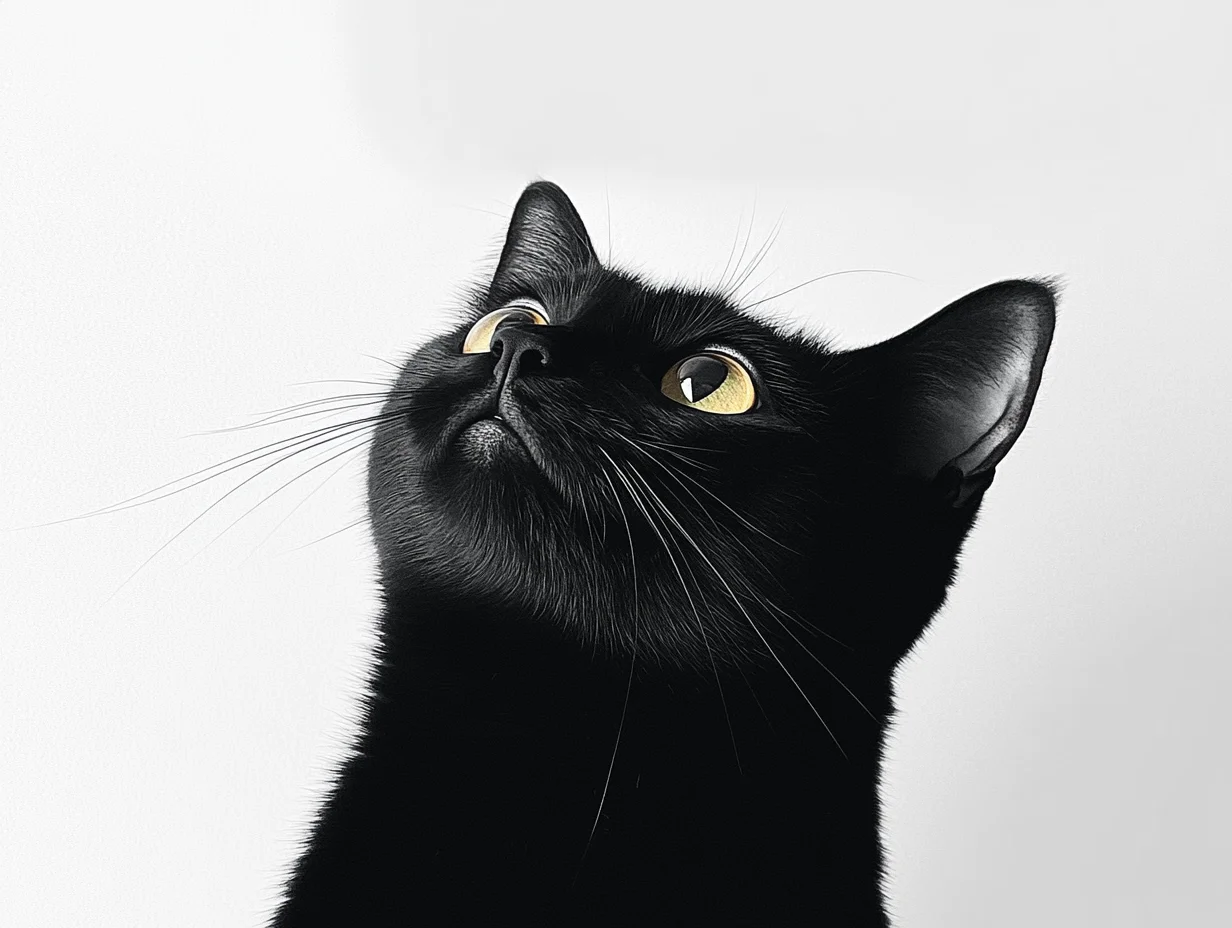
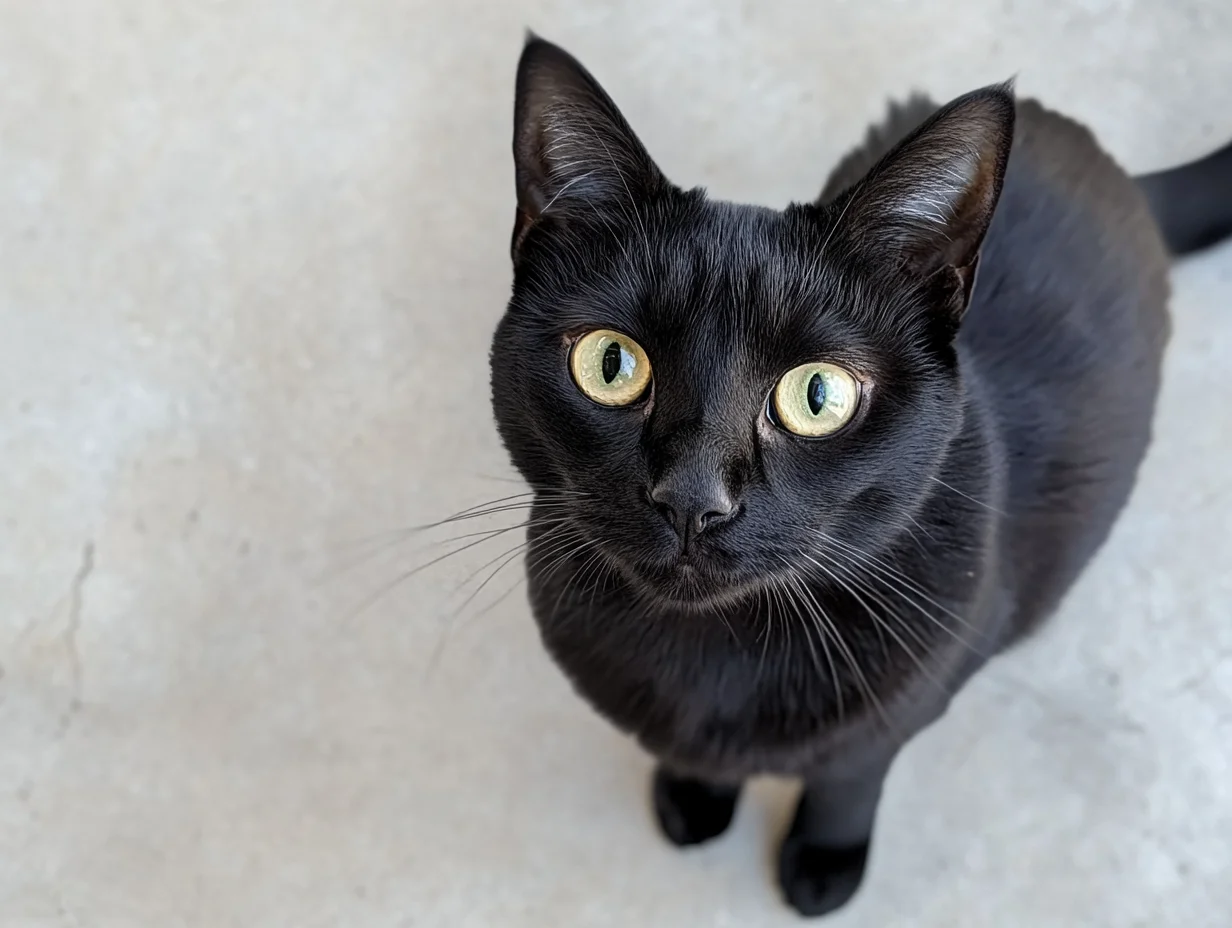
"prompt": "写实风格,一只小黑猫好奇地仰望天空,镜头从平视角度逐渐升高,最后以俯视角度捕捉到它好奇的眼神。",
"media": [
{
"type": "first_frame",
"url": "https://wanx.alicdn.com/material/20250318/first_frame.png"
},
{
"type": "last_frame",
"url": "https://wanx.alicdn.com/material/20250318/last_frame.png"
}
]
},
"parameters": {
"resolution": "720P",
"duration": 10,
"prompt_extend": false,
"watermark": true
}
}'
{task_id} 替换为上一步 API 调用返回的 task_id 值。curl -X GET 'https://maas.qianwenaiapi.com/api/v1/tasks/{task_id}' \
-H "Authorization: Bearer $DASHSCOPE_API_KEY"
与 wan2.2 的主要区别:wan2.7 使用 resolution(720P/1080P)而非像素尺寸,支持 2-15 秒时长(非固定 5 秒),使用 media 数组而非 first_frame_url/last_frame_url 参数。watermark 默认为 false。
第 1 步:创建任务获取任务 IDcurl --location 'https://maas.qianwenaiapi.com/api/v1/services/aigc/image2video/video-synthesis' \
-H 'X-DashScope-Async: enable' \
-H "Authorization: Bearer $DASHSCOPE_API_KEY" \
-H 'Content-Type: application/json' \
-d '{
"model": "wan2.2-kf2v-flash",
"input": {
"first_frame_url": "https://help-static-aliyun-doc.aliyuncs.com/file-manage-files/zh-CN/20260126/ixdxvt/wan-kf2v-blue-1.png",
"last_frame_url": "https://help-static-aliyun-doc.aliyuncs.com/file-manage-files/zh-CN/20260126/nhtdrc/wan-kf2v-blue-2.png",
"prompt": "一个可爱且表情有些忧伤的蓝色小怪物站在雨中。镜头缓慢拉近,定格在小怪物抬头仰望天空的瞬间。"
},
"parameters": {
"resolution": "720P",
"prompt_extend": true,
"watermark": true
}
}'
{task_id} 替换为上一步 API 调用返回的 task_id 值。curl -X GET https://maas.qianwenaiapi.com/api/v1/tasks/{task_id} \
--header "Authorization: Bearer $DASHSCOPE_API_KEY"
Python 和 Java SDK 示例(wan2.2)
使用 SDK 前,请先安装 DashScope SDK。运行以下代码前,请确保 DashScope Python SDK 版本不低于 1.25.8。版本过低可能出现 "url error, please check url!" 错误。安装 SDK。 import os
from http import HTTPStatus
from dashscope import VideoSynthesis
import dashscope
dashscope.base_http_api_url = 'https://maas.qianwenaiapi.com/api/v1'
api_key = os.getenv("DASHSCOPE_API_KEY")
print('please wait...')
rsp = VideoSynthesis.call(api_key=api_key,
model="wan2.2-kf2v-flash",
prompt="一个可爱且表情有些忧伤的蓝色小怪物站在雨中。镜头缓慢拉近,定格在小怪物抬头仰望天空的瞬间。",
first_frame_url="https://help-static-aliyun-doc.aliyuncs.com/file-manage-files/zh-CN/20260126/ixdxvt/wan-kf2v-blue-1.png",
last_frame_url="https://help-static-aliyun-doc.aliyuncs.com/file-manage-files/zh-CN/20260126/nhtdrc/wan-kf2v-blue-2.png",
duration=5, # 固定为 5 秒,请勿修改
prompt_extend=True,
watermark=True)
print(rsp)
if rsp.status_code == HTTPStatus.OK:
print("video_url:", rsp.output.video_url)
else:
print('Failed, status_code: %s, code: %s, message: %s' % (rsp.status_code, rsp.code, rsp.message))
运行以下代码前,请确保 DashScope Java SDK 版本不低于 2.22.6。版本过低可能出现 "url error, please check url!" 错误。安装 SDK。 import com.alibaba.dashscope.aigc.videosynthesis.VideoSynthesis;
import com.alibaba.dashscope.aigc.videosynthesis.VideoSynthesisParam;
import com.alibaba.dashscope.aigc.videosynthesis.VideoSynthesisResult;
import com.alibaba.dashscope.exception.ApiException;
import com.alibaba.dashscope.exception.InputRequiredException;
import com.alibaba.dashscope.exception.NoApiKeyException;
import com.alibaba.dashscope.utils.JsonUtils;
import com.alibaba.dashscope.utils.Constants;
public class Image2Video {
static {
Constants.baseHttpApiUrl = "https://maas.qianwenaiapi.com/api/v1";
}
// 如果未设置环境变量,请将下行替换为:apiKey="sk-xxx"
static String apiKey = System.getenv("DASHSCOPE_API_KEY");
public static void image2video() throws ApiException, NoApiKeyException, InputRequiredException {
VideoSynthesis vs = new VideoSynthesis();
VideoSynthesisParam param =
VideoSynthesisParam.builder()
.apiKey(apiKey)
.model("wan2.2-kf2v-flash")
.prompt("一个可爱且表情有些忧伤的蓝色小怪物站在雨中。镜头缓慢拉近,定格在小怪物抬头仰望天空的瞬间。")
.firstFrameUrl("https://help-static-aliyun-doc.aliyuncs.com/file-manage-files/zh-CN/20260126/ixdxvt/wan-kf2v-blue-1.png")
.lastFrameUrl("https://help-static-aliyun-doc.aliyuncs.com/file-manage-files/zh-CN/20260126/nhtdrc/wan-kf2v-blue-2.png")
.resolution("720P")
.promptExtend(true)
.watermark(true)
.build();
System.out.println("please wait...");
VideoSynthesisResult result = vs.call(param);
System.out.println(JsonUtils.toJson(result));
}
public static void main(String[] args) {
try {
image2video();
} catch (ApiException | NoApiKeyException | InputRequiredException e) {
System.out.println(e.getMessage());
}
System.exit(0);
}
}
video_url 在 24 小时后过期,请及时下载视频。
{
  "request_id": "c1209113-8437-424f-a386-xxxxxx",
  "output": {
    "task_id": "966cebcd-dedc-4962-af88-xxxxxx",
    "task_status": "SUCCEEDED",
    "video_url": "https://dashscope-result-sh.oss-accelerate.aliyuncs.com/xxx.mp4?Expires=xxx",
         ...
  },
  ...
}
核心能力
说明:根据首帧和尾帧图片生成流畅的过渡视频。
wan2.7-i2v 参数
使用 media 数组并设置 first_frame 和 last_frame 类型。首帧图生视频和首尾帧图生视频共用同一模型和端点。
input.prompt:必选。最多 5,000 字符。input.media:必选。数组中包含一个 first_frame 元素和一个 last_frame 元素。input.negative_prompt:可选。最多 500 字符。parameters.resolution:可选。720P 或 1080P(默认:1080P)。parameters.duration:可选。2-15 秒(默认:5)。parameters.prompt_extend:可选。默认:true。parameters.watermark:可选。默认:false。parameters.seed:可选。取值范围 0 ~ 2147483647。
wan2.2 / wan2.1 参数
first_frame_url:必选。首帧图片的 URL。输出视频的宽高比与该图片一致。URL 必须可公开访问(HTTP 或 HTTPS)。图片要求:格式为 JPEG、JPG、PNG(无 alpha 通道)、BMP、WEBP。分辨率每边 360-2000 像素。文件大小不超过 10 MB。last_frame_url:必选。尾帧图片的 URL。URL 必须可公开访问(HTTP 或 HTTPS)。分辨率可以与首帧不同,无需对齐。图片要求:与首帧相同。prompt:可选但建议填写。描述期望视频内容的文本提示词,支持中英文。最多 800 字符,超出部分自动截断。如果首帧和尾帧的主体或场景发生了变化,请描述过渡方式(如镜头运动或主体运动)。negative_prompt:可选。描述不希望在视频中出现的内容,支持中英文。最多 500 字符,超出部分自动截断。seed:可选。用于复现结果的随机种子。取值范围:0 ~ 2147483647。未指定时使用随机种子。由于模型的随机性,结果可能仍有差异。
| 提示词 | 首帧 | 尾帧 | 输出视频 |
|---|
| 写实风格,一只小黑猫好奇地仰望天空,镜头从平视角度逐渐升高,最后以俯视角度捕捉到它好奇的眼神。 | | | |
请确保 DashScope Python SDK 版本不低于 1.25.8。安装 SDK。 import os
from http import HTTPStatus
from dashscope import VideoSynthesis
import dashscope
dashscope.base_http_api_url = 'https://maas.qianwenaiapi.com/api/v1'
api_key = os.getenv("DASHSCOPE_API_KEY")
def sample_async_call_kf2v():
# 异步调用返回 task_id
rsp = VideoSynthesis.async_call(api_key=api_key,
model="wan2.2-kf2v-flash",
prompt="写实风格,一只小黑猫好奇地仰望天空,镜头从平视角度逐渐升高,最后以俯视角度捕捉到它好奇的眼神。",
first_frame_url="https://wanx.alicdn.com/material/20250318/first_frame.png",
last_frame_url="https://wanx.alicdn.com/material/20250318/last_frame.png",
duration=5, # 固定为 5 秒,请勿修改
prompt_extend=True,
watermark=True)
print(rsp)
if rsp.status_code == HTTPStatus.OK:
print("task_id: %s" % rsp.output.task_id)
else:
print('Failed, status_code: %s, code: %s, message: %s' % (rsp.status_code, rsp.code, rsp.message))
# 等待异步任务完成
rsp = VideoSynthesis.wait(task=rsp, api_key=api_key)
print(rsp)
if rsp.status_code == HTTPStatus.OK:
print(rsp.output.video_url)
else:
print('Failed, status_code: %s, code: %s, message: %s' % (rsp.status_code, rsp.code, rsp.message))
if __name__ == '__main__':
sample_async_call_kf2v()
请确保 DashScope Java SDK 版本不低于 2.22.6。安装 SDK。 import com.alibaba.dashscope.aigc.videosynthesis.VideoSynthesis;
import com.alibaba.dashscope.aigc.videosynthesis.VideoSynthesisParam;
import com.alibaba.dashscope.aigc.videosynthesis.VideoSynthesisResult;
import com.alibaba.dashscope.exception.ApiException;
import com.alibaba.dashscope.exception.InputRequiredException;
import com.alibaba.dashscope.exception.NoApiKeyException;
import com.alibaba.dashscope.utils.JsonUtils;
import com.alibaba.dashscope.utils.Constants;
public class Image2Video {
static {
Constants.baseHttpApiUrl = "https://maas.qianwenaiapi.com/api/v1";
}
// 如果未设置环境变量,请将下行替换为:apiKey="sk-xxx"
static String apiKey = System.getenv("DASHSCOPE_API_KEY");
public static void image2video() throws ApiException, NoApiKeyException, InputRequiredException {
VideoSynthesis vs = new VideoSynthesis();
VideoSynthesisParam param =
VideoSynthesisParam.builder()
.apiKey(apiKey)
.model("wan2.2-kf2v-flash")
.prompt("写实风格,一只小黑猫好奇地仰望天空,镜头从平视角度逐渐升高,最后以俯视角度捕捉到它好奇的眼神。")
.firstFrameUrl("https://wanx.alicdn.com/material/20250318/first_frame.png")
.lastFrameUrl("https://wanx.alicdn.com/material/20250318/last_frame.png")
.resolution("720P")
.promptExtend(true)
.watermark(true)
.build();
// 异步调用
VideoSynthesisResult task = vs.asyncCall(param);
System.out.println(JsonUtils.toJson(task));
System.out.println("please wait...");
// 获取结果
VideoSynthesisResult result = vs.wait(task, apiKey);
System.out.println(JsonUtils.toJson(result));
}
public static void main(String[] args) {
try {
image2video();
} catch (ApiException | NoApiKeyException | InputRequiredException e) {
System.out.println(e.getMessage());
}
System.exit(0);
}
}
第 1 步:创建任务获取任务 IDcurl --location 'https://maas.qianwenaiapi.com/api/v1/services/aigc/image2video/video-synthesis' \
-H 'X-DashScope-Async: enable' \
-H "Authorization: Bearer $DASHSCOPE_API_KEY" \
-H 'Content-Type: application/json' \
-d '{
"model": "wan2.2-kf2v-flash",
"input": {
"first_frame_url": "https://wanx.alicdn.com/material/20250318/first_frame.png",
"last_frame_url": "https://wanx.alicdn.com/material/20250318/last_frame.png",
"prompt": "写实风格,一只小黑猫好奇地仰望天空,镜头从平视角度逐渐升高,最后以俯视角度捕捉到它好奇的眼神。"
},
"parameters": {
"resolution": "720P",
"prompt_extend": true,
"watermark": true
}
}'
{task_id} 替换为上一步 API 调用返回的 task_id 值。curl -X GET https://maas.qianwenaiapi.com/api/v1/tasks/{task_id} \
--header "Authorization: Bearer $DASHSCOPE_API_KEY"
输入图片
- 图片数量:一张首帧图片和一张尾帧图片。
- 图片格式:JPEG、JPG、PNG(无 alpha 通道)、BMP、WEBP。
- 图片分辨率:每边 360-2000 像素。
- 文件大小上限:每张图片 10 MB。
- 输入方式:图片 URL、本地文件路径。
方式 1:图片 URL(HTTP API 和 SDK)— 推荐
- 公开 URL:支持 HTTP 或 HTTPS。示例:
https://xxxx/xxx.png。
不同编程语言(Python 和 Java)的路径格式不同,请严格按照以下规则填写。Python SDK:支持绝对路径和相对路径。路径规则:| 操作系统 | 输入文件路径 | 示例(绝对路径) | 示例(相对路径) |
|---|
| Linux / macOS | file://{绝对路径或相对路径} | file:///home/images/test.png | file://./images/test.png |
| Windows | file://{绝对路径或相对路径} | file://D:/images/test.png | file://./images/test.png |
| 操作系统 | 输入文件路径 | 示例(绝对路径) |
|---|
| Linux / macOS | file://{绝对路径} | file:///home/images/test.png |
| Windows | file:///{绝对路径} | file:///D:/images/test.png |
import os
from http import HTTPStatus
# dashscope sdk >= 1.25.8
from dashscope import VideoSynthesis
import dashscope

dashscope.base_http_api_url = 'https://maas.qianwenaiapi.com/api/v1'

# 从环境变量获取 DashScope API Key
api_key = os.getenv("DASHSCOPE_API_KEY")

# ========== 图片输入方式(选择其一)==========
# [方式 1] 使用公开图片 URL
first_frame_url = "https://wanx.alicdn.com/material/20250318/first_frame.png"
last_frame_url = "https://wanx.alicdn.com/material/20250318/last_frame.png"

# [方式 2] 使用本地文件路径(file:// + 文件路径)
# 使用绝对路径
# first_frame_url = "file://" + "/path/to/your/first_frame.png"  # Linux/macOS
# last_frame_url = "file://" + "C:/path/to/your/last_frame.png"  # Windows
# 或使用相对路径
# first_frame_url = "file://" + "./first_frame.png"              # 使用实际路径
# last_frame_url = "file://" + "./last_frame.png"                # 使用实际路径

def sample_sync_call_kf2v():
  print('please wait...')
  rsp = VideoSynthesis.call(api_key=api_key,
                                model="wan2.2-kf2v-flash",
                                prompt="写实风格,一只小黑猫好奇地仰望天空,镜头从平视角度逐渐升高,最后以俯视角度捕捉到它好奇的眼神。",
                                first_frame_url=first_frame_url,
                                last_frame_url=last_frame_url,
                                resolution="720P",
                                prompt_extend=True)
  print(rsp)
  if rsp.status_code == HTTPStatus.OK:
    print(rsp.output.video_url)
  else:
    print('Failed, status_code: %s, code: %s, message: %s' %
                (rsp.status_code, rsp.code, rsp.message))


if __name__ == '__main__':
  sample_sync_call_kf2v()
// Copyright (c) Alibaba, Inc. and its affiliates.

// dashscope sdk >= 2.20.1
import com.alibaba.dashscope.aigc.videosynthesis.VideoSynthesis;
import com.alibaba.dashscope.aigc.videosynthesis.VideoSynthesisParam;
import com.alibaba.dashscope.aigc.videosynthesis.VideoSynthesisResult;
import com.alibaba.dashscope.exception.ApiException;
import com.alibaba.dashscope.exception.InputRequiredException;
import com.alibaba.dashscope.exception.NoApiKeyException;
import com.alibaba.dashscope.utils.Constants;
import com.alibaba.dashscope.utils.JsonUtils;

import java.util.HashMap;
import java.util.Map;


public class Kf2vSyncIntl {

  static {
    Constants.baseHttpApiUrl = "https://maas.qianwenaiapi.com/api/v1";
  }

  // 从环境变量获取 DashScope API Key
  static String apiKey = System.getenv("DASHSCOPE_API_KEY");

  /**
       * 图片输入方式(选择其一):
       *
       * [方式 1] 公开 URL
       */
  static String firstFrameUrl = "https://wanx.alicdn.com/material/20250318/first_frame.png";
  static String lastFrameUrl = "https://wanx.alicdn.com/material/20250318/last_frame.png";

       /**
       * [方式 2] 本地文件路径(file:// + 绝对路径 或 file:/// + 绝对路径)
       */
  // static String firstFrameUrl = "file://" + "/your/path/to/first_frame.png";  // Linux/macOS
  // static String lastFrameUrl = "file:///" + "C:/path/to/your/img.png";        // Windows

  public static void syncCall() {

    Map<String, Object> parameters = new HashMap<>();
    parameters.put("prompt_extend", true);
    parameters.put("resolution", "720P");

    VideoSynthesis videoSynthesis = new VideoSynthesis();
    VideoSynthesisParam param =
        VideoSynthesisParam.builder()
            .apiKey(apiKey)
            .model("wan2.2-kf2v-flash")
            .prompt("写实风格,一只小黑猫好奇地仰望天空,镜头从平视角度逐渐升高,最后以俯视角度捕捉到它好奇的眼神。")
            .firstFrameUrl(firstFrameUrl)
            .lastFrameUrl(lastFrameUrl)
            .parameters(parameters)
            .build();
    VideoSynthesisResult result = null;
    try {
      System.out.println("---sync call, please wait a moment----");
      result = videoSynthesis.call(param);
    } catch (ApiException | NoApiKeyException e){
      throw new RuntimeException(e.getMessage());
    } catch (InputRequiredException e) {
      throw new RuntimeException(e);
    }
    System.out.println(JsonUtils.toJson(result));
  }

  public static void main(String[] args) {
    syncCall();
  }
}
输出视频
- 视频数量:一个。
- 规格:不同模型的规格有所不同,详见视频生成模型。
- URL 有效期:24 小时。
- 尺寸:由首帧图片和
resolution 设置共同决定。
- 模型保持首帧图片的宽高比,将总像素数缩放到接近目标值。由于编码要求,输出宽度和高度必须是 16 的倍数,模型会自动调整尺寸。
- 例如:输入图片为 750x1000(宽高比 3:4 = 0.75),设置 resolution = "720P"(目标像素总数约 920,000),输出可能为 816 x 1104(宽高比约 0.739,像素总数约 900,000),宽高均可被 16 整除。
API 参考
常见问题
如何生成特定宽高比(如 3:4)的视频?
wan2.7:宽高比由首帧图片决定。在 media 数组中提供 first_frame 时,ratio 参数会被忽略,输出视频的宽高比与图片一致。
wan2.2 及更早版本:API 不支持直接指定宽高比,只能通过 resolution 参数设置视频分辨率。
resolution 参数控制的是总像素数,而非严格的宽高比。模型优先保持首帧图片(first_frame_url)的原始宽高比,仅做微调以满足编码要求(宽高必须是 16 的倍数)。要获得接近 3:4 的视频,请上传 3:4 宽高比的首帧图片。
例如:输入图片为 750x1000(宽高比 3:4 = 0.75),设置 resolution = "720P"(目标像素总数约 920,000),输出可能为 816 x 1104(宽高比约 0.739,像素总数约 900,000),宽高均可被 16 整除。
SDK 报错:"url error, please check url!"
请确认:
- DashScope Python SDK 版本不低于
1.25.8。
- DashScope Java SDK 版本不低于
2.22.6。
版本过低会导致 "url error, please check url!" 错误。升级 SDK。